
AI Sales Assistant Guide: What It Does and How to Start
By DMpro team
Learn what an AI sales assistant does, which tasks to hand off, how to measure real results, and which rules to set before it sends messages.
McKinsey's Global Survey on AI, published May 30, 2024, found that 65% of respondents said their organizations were regularly using generative AI, nearly twice the share reported only ten months earlier, and it identified marketing and sales as the functions with the largest increase in adoption (McKinsey's State of AI 2024). Selling became one of the first places this technology earned a budget line.
Adoption does not answer the buying question. An assistant can write a decent DM. Writing copy is the easy part. What matters is whether it produces qualified conversations and revenue, and whether it hands the right replies to a human quickly enough for that person to act.
Message volume is the easiest number to grow and the least useful one to report. Sends can rise while reply quality, lead fit, and handoffs get worse.
Judge the assistant by the conversations it creates and the point where a person takes over. A useful system preserves context, recognizes when a prospect needs human judgment, and leaves that person a clear next step.
What an AI Sales Assistant Actually Does
Salesforce's sixth State of Sales report, a double-anonymous survey run from March 8 to April 18, 2024, found that 81% of sales teams were either experimenting with AI or had fully implemented it, with 41% already deployed in their operations (Salesforce's 2024 sales AI statistics). This isn't a demo category anymore. It sits inside research, qualification and revenue work.
Think of it as a sharp junior rep who never sleeps. It'll read 200 profiles before breakfast, write a first message for each one, and log every touch without complaining. It also needs written instructions, a defined territory, and someone checking its work before anything embarrassing goes out.
The revenue association, read honestly
The same Salesforce survey reported that 83% of sales teams using AI said their revenue grew during the year, compared with 66% of teams not using AI. That's an association from a survey, not proof the software caused the growth. Teams that adopt early tend to be better run in other ways too.
Practical rule: judge an assistant on qualified conversations and closed revenue per prospect, never on how many messages it sent.
If you're comparing categories before you buy, AY Automate's roundup of AI sales automation tools is a useful map of what sits where, from enrichment to sequencing to call assistance.
Three things decide whether any of them work for you:
- Which tasks you hand over, and which decisions stay yours.
- How a lead moves from a raw list to a reply someone answers.
- How you measure and govern it once it's sending without you watching.
Sales Tasks an Assistant Handles and What You Approve
Give the assistant the repetitive, knowledge-heavy work where slow lookups and knowledge gaps throttle your team. Keep claims, positioning and escalation with people.
The clearest evidence for that split comes from a field study of 5,172 customer-support agents, where access to a generative-AI conversational assistant raised issues resolved per hour by 15% on average, with novice and lower-skilled workers improving 34% while experienced, highly skilled workers saw minimal impact (the NBER working paper). The mechanism was operational: real-time suggestions helped people find information and phrase replies faster.
Where the hours actually go
| Sales Task | What the Assistant Does | What You Still Decide |
|---|---|---|
| Prospect research | Pulls role, company, recent posts and website context | Confirms the account is a real fit |
| Lead qualification | Scores each lead against your stated criteria and records the reason | Sets the criteria and reviews borderline scores |
| First-message drafting | Writes a personalized opening from profile and recent activity | Approves claims, offers and tone |
| Follow-up sequencing | Schedules follow-ups and branches when a prospect replies | Sets cadence, daily limits and stop rules |
| Reply triage | Labels replies by intent such as interested, question, objection or opt-out | Takes over warm, angry or high-value replies |
| Call or meeting preparation | Summarizes account history and open questions | Checks facts before the conversation |
| Account summaries | Keeps a running note of each prospect's status and touchpoints | Decides the next move for each account |
| Pipeline reporting | Counts sent messages, replies, meetings and stage changes | Decides which numbers count as success |
Notice the pattern in the right column. Every decision that could cost you a deal, a reputation or a legal argument stays with a person.
Start with two tasks, not eight
Pick the two or three rows eating the most manual hours. For most founders that's prospect research and first-message drafting, because both are slow, boring and easy to check in a batch.
Say you're selling analytics to seed-stage SaaS teams. Reading 60 bios and recent posts takes an afternoon. An assistant does it in minutes, and you spend your afternoon rejecting the 20 accounts that were never a fit. That's a real gain, and it's measurable.
Don't hand over anything touching pricing, promises or an existing relationship until the routine tasks are running clean. And segment your results by rep tenure and task type, since the support-agent study shows averages hide who benefits.
Write your own version of that table before you switch anything on. If you can't name what you still decide for a task, you're not ready to automate it.
Where AI Helps Most and Where Humans Still Win
AI is strongest as a helper, not a replacement for a skilled seller.
A randomized field-experiment program covering millions of users and products tested this directly. In a pre-sale service-chatbot workflow, AI-generated replies increased sales by 16.3% and conversion by 21.7% versus no service, while combining AI replies with human participation produced 25.0% higher sales and 29.0% higher conversion (the arXiv field-experiment paper). AI alone did not significantly outperform human replies.
Read that again in outbound terms. Automating a reply buys you speed and coverage over silence. It doesn't buy you superiority over a good rep who's paying attention. The biggest lift came from the combination.
The split I'd build
For X DM outreach, that means an assistant that does the prep and a human who owns the moments that decide the deal.
- Context extraction: the assistant reads the bio, recent posts and any public signal, then saves what it found next to the lead.
- First-pass qualification: it scores against your criteria and writes down why, so you can audit a bad score later.
- Drafting and personalization: it writes the opener referencing something real, not just a first name.
- Reply sorting: it labels intent so warm replies surface first instead of sitting under 40 "not interested" messages.
People win on a different set of moments:
- Tricky objections, where the prospect's real concern isn't the one they typed.
- Relationship moments, like a founder who already knows you or a public complaint.
- Pricing and commercial terms, where a wrong number becomes a commitment.
- Anything where a false claim could cost the account, including security, integrations and results.
If a reply could change the deal or damage trust, a person reads it before it sends.
Test the three paths, not one
The experiment's design is the part many teams skip. Compare AI-only, human-only and AI-plus-human on randomized cohorts of similar prospects, and track positive-reply rate, qualified-opportunity rate, conversion, escalation rate and downstream revenue.
If you only test "assistant on" versus "assistant off," you'll credit the software for work your best rep was already doing. Branching after a reply is where the value shows up: the sequence changes course based on what the prospect said, and a person steps in when intent is unclear or the situation calls for human judgment.
Governance Rules to Set Before Autonomous Sending
More automation isn't automatically safer. Personalization can actively reduce trust when a message reveals something the recipient didn't expect a seller to know. Stitching together a prospect's public posts, profile details and website into one intimate-sounding message reads as surveillance, not research.
Buyers are already wary. In buyer research cited in Salesforce's State of Sales report, 37.25% cited data privacy and security as a concern when using generative-AI-derived information in B2B purchasing contexts, and 51% of sales leaders using AI said disconnected systems delay or limit their initiatives (Salesforce State of Sales report).

The checklist to settle before launch
- Approved sources: public profile, public posts and the company website. Nothing scraped from private groups, purchased lists or personal data you can't justify.
- Stale and conflicting facts: if the bio says one role and the recent posts say another, the assistant drops the reference instead of guessing.
- An abstain threshold: below your confidence bar, it sends a plain message with no personalization rather than inventing a hook.
- A claim log: every factual statement in a message gets recorded with its source, so you can trace a complaint back to a specific line.
- Mandatory human approval for sensitive segments: enterprise accounts, existing customers, anyone who's complained before.
- One suppression list: opt-outs propagate across every campaign and every account, not just the sequence that triggered them.
- A restriction and deletion path: decide now who pauses sending when an account is limited, and how you purge a prospect's data on request.
A generated reply should never promise an unapproved price, discount, result or appointment. That's a hard rule, not a tone preference.
Safeguards aren't guarantees
Variable delays, typing simulation, sending caps and account monitoring reduce operational risk. They don't eliminate platform, privacy or reputational exposure, and any vendor telling you otherwise is selling you comfort. Our own compliance monitoring approach is built around watching and pausing, not around promising immunity.
Data quality deserves the same attention. Duplicate records and disconnected systems are how an assistant messages the same person twice from two accounts, or pitches someone who already bought. Deduplicate on handle and email before your first send, and reconcile your CRM weekly.
X DM Rules and Sending Limits
Learn the platform rules before a single message leaves your account. X's automation rules prohibit unsolicited bulk or automated DMs, and permit automated messages only when the recipient previously requested contact or clearly indicated on X that they want to be contacted, such as by messaging you first, with a clear, easy opt-out that you honor promptly (X's automation rules).
That's the floor for your queue design, not a footnote.
| Rule | Limit or requirement | What it means for you |
|---|---|---|
| Automated DM consent | Only after prior request or visible interest, with a clear opt-out | Prioritize opted-in prospects |
| Account daily limit | 500 messages per day across web, mobile, phone and API (X limits) | Manual DMs count toward the same allowance |
| Per-user POST limit | 15 requests per 15-minute window (X API rate limits) | Pace queues in short bursts |
| Per-user daily POST limit | 1,440 requests per 24 hours | Technical ceiling, not a target |
| Application DM limit | 1,440 requests per 24 hours across several DM endpoints | Requests return 429 when the limit is reached |
Turn those into settings:
- Filter your list to opted-in or visibly interested prospects before anything queues.
- Set a daily cap per account well below the account ceiling, leaving room for real conversations and support replies. Our breakdown of the Twitter DM limit shows how to size that per profile.
- Space sends with pauses and retries, and monitor 429 responses instead of hammering the endpoint.
- Stop the sequence immediately for anyone who opts out.
DMpro organizes queues, lead status and follow-ups. It doesn't change X's consent requirements, and neither does any other tool.
How the Assistant Moves a Lead From List to Reply
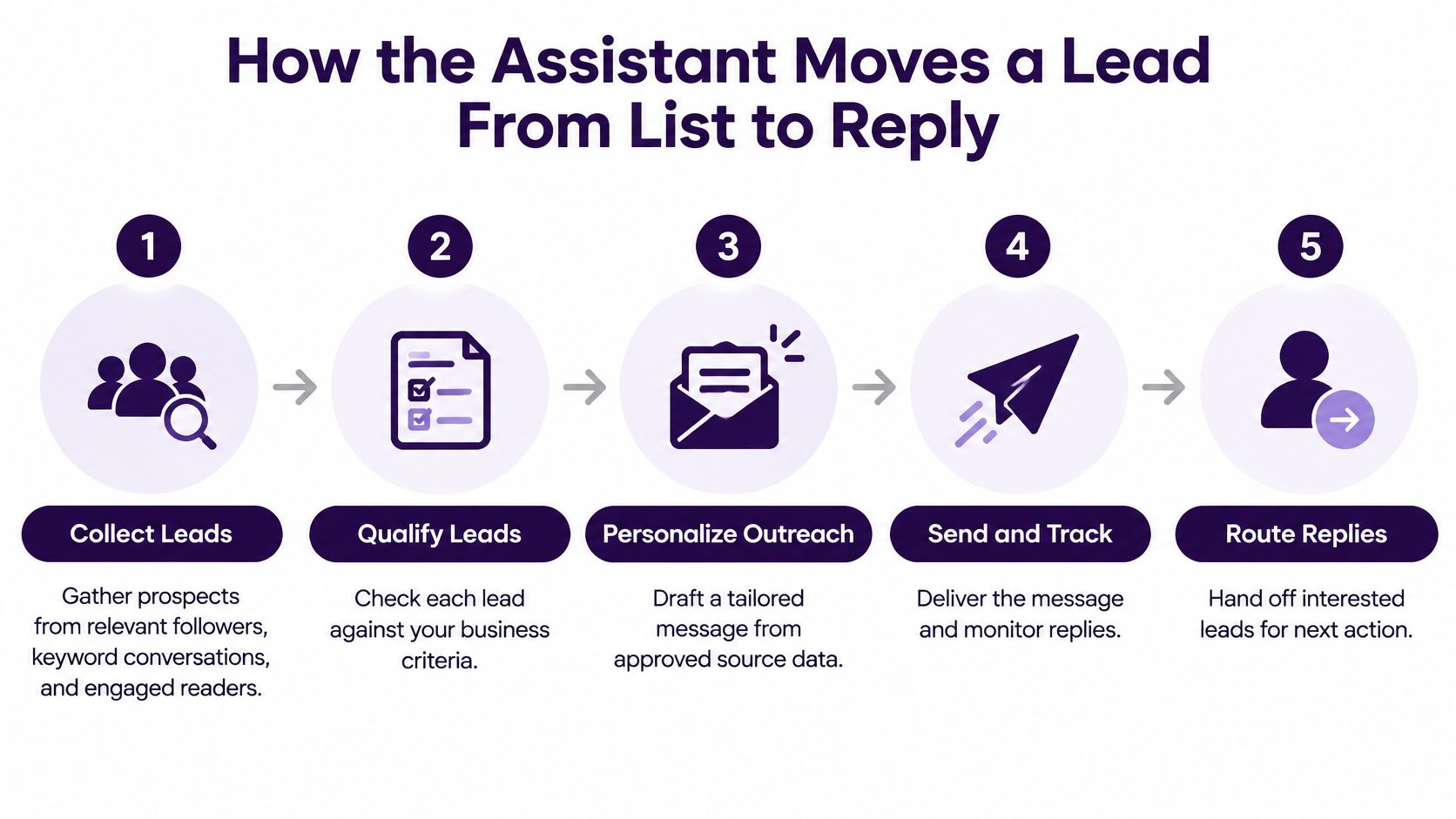
The order matters more than the feature list. Here's the path a lead should travel.
-
Collect prospects that match your criteria. Pull from followers of relevant accounts, keyword-matched conversations, and people who already engaged with your posts. Engagement signals beat scraped lists because interest is already visible. Our searches can be scheduled to run continuously so the list builds while you sleep.
-
Qualify each lead against your business rules, and save the reason next to the score. A score without a reason is unauditable. Qualification compares the available profile and conversation evidence with your own criteria, so write those criteria carefully. Our lead qualification process walks through setting them up.
-
Pull context from the profile, recent posts and your website. The message needs one real, specific thing to reference. If nothing usable exists, send a plain message rather than a fabricated compliment.
-
Draft the first message, then check a sample batch before anything sends. Read 20 drafts out loud. You'll catch the overpromising and the weird phrasing in ten minutes.
-
Send within your pacing limits and run follow-ups that branch on replies. A prospect who answered shouldn't receive the "just bumping this" message scheduled three days ago.
-
Route replies by intent. Interested people come straight to you. Questions and objections go to human review. Opt-outs stop the sequence at once, across every campaign.
-
Review reply rate, meetings booked and pipeline movement weekly. Leads tracked by status such as New, Contacted and Replied make that review a five-minute job instead of a spreadsheet archaeology project.
What a healthy first week looks like
Small list, short feedback loop, clear records. You should be able to open any lead and see whether it was qualified, contacted, replied or handed off, plus the reason it scored the way it did. Campaign details should show sent messages, contacted leads, replies and each lead's state without you exporting anything.
A first week where you personally read every reply is worth more than a month of unreviewed sending.
If you can't reconstruct why a specific person got a specific message, your workflow isn't ready to scale. Fix the record-keeping before you add accounts.
Metrics That Show Real Sales Impact
Reply rate is the most seductive number in outbound. It climbs when your message is confusing, provocative or vague, and none of those replies buy anything.
A framework worth using connects the whole funnel: qualified-reply rate, meeting quality, opportunity creation, conversion, revenue, unsubscribe or complaint rate, and time-to-human-handoff, compared against a properly controlled baseline and segmented by audience, message type, account and sending volume (research on AI sales tool adoption statistics). The contrarian finding in that work is that more automation doesn't necessarily mean better performance.
Seven metrics and their warning signs
| Metric | What It Tells You | Warning Sign |
|---|---|---|
| Qualified-reply rate | Share of replies from prospects who fit your criteria | Replies rise but fit drops |
| Meeting quality | Whether booked calls match your ideal customer | Meetings happen but rarely progress |
| Opportunity creation | Number of real pipeline opportunities from campaigns | Opportunities flat while replies climb |
| Conversion rate | Share of contacted prospects who become customers or next-stage deals | Conversion lower than the manual baseline |
| Revenue per cohort | Revenue from AI-assisted versus manual cohorts | AI cohort earns less per prospect |
| Unsubscribe or complaint rate | Signals of recipient harm or distrust | Any sustained rise in opt-outs or reports |
| Time to human handoff | How quickly a warm reply reaches a person | Hot replies wait hours or days |
Compare fairly or don't bother
Run three cohorts on similar audiences, message types and sending volumes: AI-assisted, human-only, and AI-plus-human. Randomize who lands where. If your best leads get the assistant, you've measured your targeting, not your software.
The pitfalls that ruin these tests:
- Selection bias: the assistant gets the warmest segment and wins by default.
- Survivorship bias: you count the campaigns that worked and forget the ones you killed.
- Attribution across touches: a prospect saw your posts, got a DM, then booked from an email. Decide the credit rule before you start.
- Optimizing reply rate alone: you'll accidentally train the system to write messages that provoke rather than qualify.
Channel matters too. If you're weighing X against community platforms, Bazzly's guide to Reddit lead generation tools is a sensible comparison of how differently intent shows up there. For the rep-level view, our sales rep productivity metrics piece covers which activity numbers are worth keeping.
The pause rule: stop or adjust when negative sentiment, opt-outs or complaints rise, even if replies look strong. Engagement is not permission.
Pick a Pilot and Test It on One Campaign
Don't roll this out across your pipeline. Run one narrow test you can read.
- Choose one offer and one audience segment. "Seed-stage SaaS founders doing their own outbound" is a segment. "B2B companies" isn't.
- Write your qualification criteria and save your business profile. In our AI Workspace, you save the offer and audience under Business profile, then open Qualification. Criteria first, automation second.
- Preview a small batch of lead assessments and read the reasons. Each assessed lead uses one AI credit, so a batch of ten uses ten. Cheap tuition for finding out your criteria are too loose.
- Use Suggest only while you review reply quality in real conversations. Tighten the rules wherever a draft overpromises. Suggested replies are training wheels, not a driver.
- Run about two weeks against a manual baseline, tracking qualified replies, meetings and opt-outs. Same audience quality, same offer, comparable volume.
- Decide with a rule you wrote in advance: scale only if qualified replies and meetings match or beat the baseline and complaints stay flat.
Before you commit to any tool, check three things: it connects to your CRM, its pricing is published plainly, and it respects platform consent and sending limits rather than promising to route around them.
If your pilot is cold DMs on X, DMpro.ai handles lead discovery, personalized drafts and reply-based follow-ups, so you can run this test without building the workflow yourself.
An AI sales assistant earns its place by handing you qualified conversations, not by sending more messages. DMpro finds prospects on X who match your criteria, writes personalized openers from their profile and recent activity, and branches follow-ups the moment someone replies, so you spend your time on the conversations that can close. If you're tired of manually sending DMs every day, try DMpro and let it run outreach while you sleep.
Put your outreach plan into practice
Find relevant leads on X (Twitter), personalize your messages, and manage the replies in DMpro.
Get started