
Lead Qualification Process: A Step-by-Step Guide for 2026
A practical lead qualification process: set criteria, score prospects, route Hot, Warm and Cold leads, and stay consent-compliant on X.
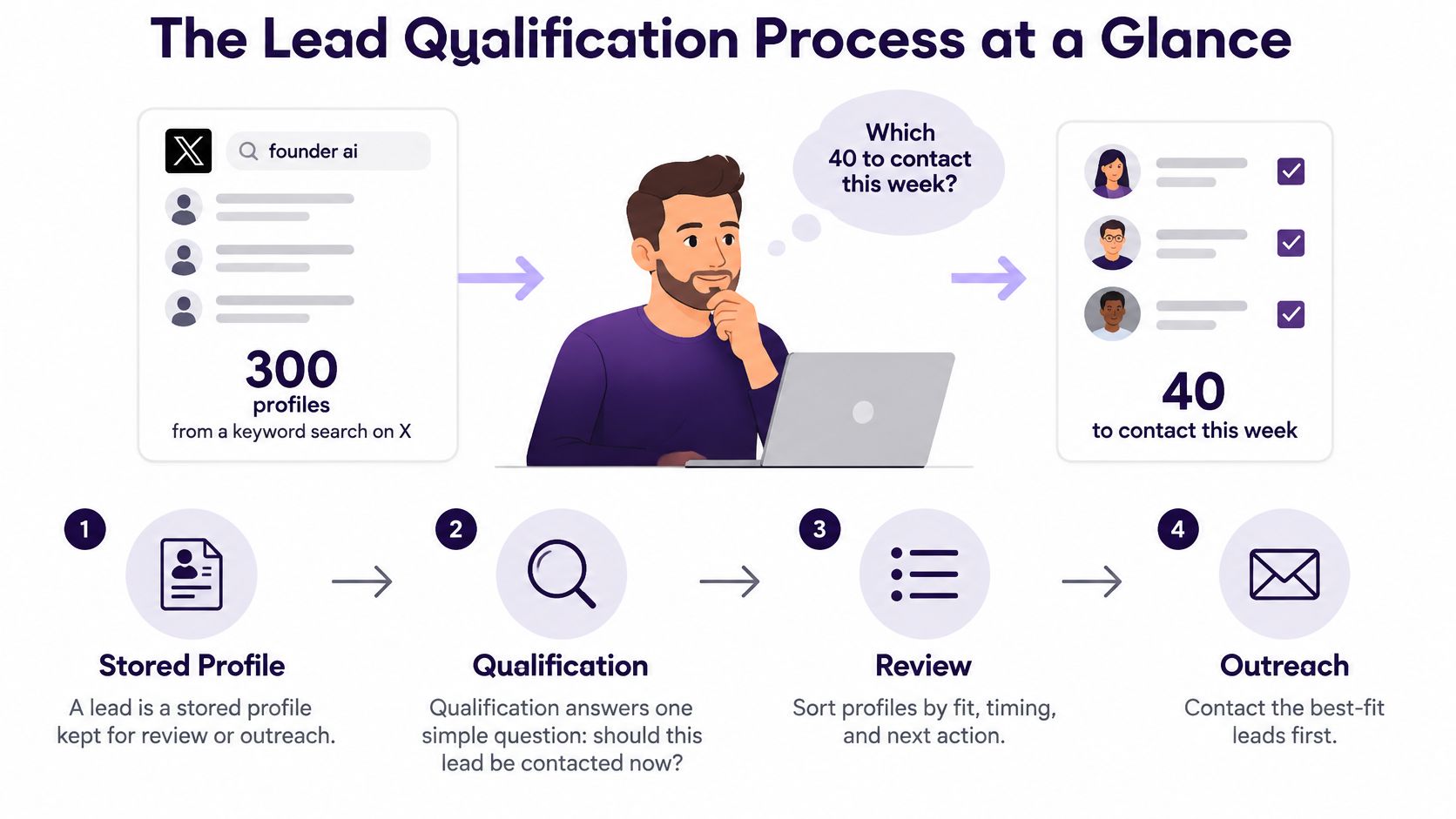
You've got 300 profiles from a keyword search on X and want to know which 40 are worth contacting this week. A keyword match gives you somewhere to start, but it doesn't prove a person fits your offer, has a real need, or wants to hear from you.
A lead is a profile you've stored for review or outreach. The lead qualification process answers one practical question: is this prospect worth a conversation now? The answer should come from a few clear checks, not one score or a list of matching words.
The Lead Qualification Process at a Glance
Start by turning those 300 profiles into records you can compare. Then gather enough public context to decide which people fit your audience, show a relevant need, and can be contacted appropriately.
The process has five stages. Each one creates evidence the next stage uses, so qualification works better as a workflow than as a one-time score.
Lead qualification stages at a glance
| Stage | Question It Answers | Output | Time Target |
|---|---|---|---|
| Capture | When and where did this prospect appear? | Lead record with source and timestamp | Same day as discovery |
| Enrich | What public context do we have? | Profile, recent posts and website notes | Before the first message |
| Assess | Does the prospect fit and show a real need? | Field-level evidence with confidence labels | Within 24 hours of a reply |
| Route | How strong is the signal? | Hot, Warm or Cold label | Immediately after assessment |
| Follow Up | What is the next step and who owns it? | Direct ask, value-first opener or skip | Hot leads within 1 hour of a reply |
Capture records the source and time you found someone, so you can trace why that profile entered your list. Enrich adds public context, such as their role, recent posts, and company website, before you draft a message.
Assess checks fit and need separately, using evidence rather than assumptions. Route gives the lead a useful next-action tier, while Follow Up assigns an owner and a specific action instead of leaving the record idle.
DMpro can keep collected profiles, qualification context, and lead status together as you work through those steps. If you're refining the way your team defines a qualified lead, Grou's guide to how to improve your lead qualification process offers another useful perspective.
Define Your Ideal Prospect Criteria
Set your criteria before you review profiles. Without shared rules, one person may prioritize a post about a business problem while another rejects the same prospect because their job title doesn't match exactly.
Use four layers. Core fit is required. Preferred fit raises priority but isn't a must-have. Exclusions remove profiles that clearly aren't suitable. Buying signals show that a relevant problem may be active now.
| Criterion | What to Define | Example | Evidence That Passes |
|---|---|---|---|
| Core fit | The role, company stage or use case that must be present | Operations leads at companies with 10 to 200 staff | Bio or recent posts name the role and the company |
| Preferred fit | Traits that raise priority but are not required | Product launched in the last six months | Website or profile confirms the launch date |
| Exclusions | Profiles to drop automatically | Agencies selling the same service, students | Bio or handle matches an exclusion keyword |
| Buying signals | Public actions that show a live problem | Posts asking for help with outbound lead generation | Post made within the last 30 days |
Say a project-management SaaS founder wants operations leads at companies with 10 to 200 staff. A recent product launch raises a profile's priority, but it doesn't replace the core fit requirement. An agency bio that matches an exclusion can remove that profile before anyone spends time reviewing its posts.
Buying signals need context, too. A post asking for help with outbound lead generation may show a live problem. A profile that merely contains the word “sales” doesn't establish that the person needs your product.
Practical rule: Make each criterion testable against a profile, post, or company page. If you can't point to evidence, mark the field unknown instead of treating your guess as fact.
DMpro's qualification criteria are set up in AI Workspace by saving business profile information about your offer and audience, then opening Qualification. After a website import, DMpro prepares a business profile and criteria for you to review, edit, and approve. Core fit is required, and automatic assessment stays off in a new setup until a person has checked the rules against real leads.
If you need to build or refine your target-company definition first, use this guide to build an ideal customer profile. For research that starts with company attributes, Context.dev also explains how to find companies through an API.
Assess Each Prospect Without Overrating Fit
A rigid checklist can reject a promising prospect just because one answer is missing. Use BANT, Budget, Authority, Need, and Timeline, as prompts for a conversation instead. Score each dimension separately, then read it alongside the prospect's fit and observed intent. Capterra's guide to the BANT framework notes that checklist-style use can miss the framework's purpose as a buyer-focused conversation aid.
Say an operations lead posts about a recent problem with outbound follow-up, but hasn't discussed budget. The problem and fit may justify a Warm label and a clarifying question, rather than an automatic rejection.

For every important field, label the evidence confirmed, inferred, or unknown. A public post may confirm that a problem exists, while budget or purchase timing may remain unknown. When a critical field is unknown, ask a useful question instead of turning uncertainty into a verdict.
Use this sequence to assess a reply:
- Confirm the observed context, such as the post or company detail that prompted outreach.
- Test whether a material problem exists.
- Ask what impact the problem has or why it matters now.
- Identify who participates in the decision.
- Establish the evaluation or implementation timing.
- Record the evidence behind each field.
A person who isn't the economic buyer may still be a valuable contact. Record their role and whether they can introduce you to decision-makers; don't reject them solely because they lack purchasing authority.
Account-level context matters as well. A 2025 trend report estimates that B2B buying groups involve 8 to 13 stakeholders, so qualify the account as well as the person who replied, and log each contact's role in the group (Pipeline360's 2025 report).
AI can help organize evidence, but a score isn't proof of intent. One analysis covering 9,702 leads at nine B2B companies reported 83% accuracy for AI scoring versus 68% for manual scoring, while also finding that people read nuanced intent better and blended scoring worked best (Neil Patel's lead-scoring analysis). Use AI for a first pass, then send borderline cases to a person. If the person disagrees with an AI assessment, record the evidence and review the rule. Sparse public information isn't proof of poor fit. For more on using automated scores without treating them as a verdict, see automated lead scoring.
Confirm Consent Before Any Automated Message
A founder scrapes 2,000 competitor followers and sends every person the same pitch. That's not a shortcut to a qualified audience. X's automation policy prohibits unsolicited bulk or automated Direct Messages. Automated DMs are allowed only when recipients have requested contact or clearly indicated intent on X, such as sending the business a DM. The sender must also provide an easy opt-out and promptly honor it. Following an account or allowing DMs from anyone doesn't count as consent, according to X's automation policy.
Before an automated message goes out, check whether the prospect has signaled intent and whether the message reflects something specific they did or posted. Don't rely on an open inbox as permission. X's developer guidelines also limit an automated reply to one per interaction and require an easy opt-out for automated DMs.
Message quality matters too. X flags repeated DMs made mostly of links without commentary as inauthentic behavior (X's authenticity rules). Keep the message relevant to the person's actual context rather than sending a link-heavy template.
For example, a founder who replies to your post asking for tool recommendations has shown intent. A stranger who only follows your account hasn't. DMpro can help organize opted-in prospects and manage follow-up logic, but your process still needs a firm permission check. The compliance monitoring guide can help you think through how to keep that check visible in your workflow.
Make these questions a hard stop before any Hot, Warm, or Cold lead gets an automated message:
- Did they ask for contact or clearly signal intent?
- Can they opt out easily, and will you honor it promptly?
- Is the message specific to something they posted or did?
Route Hot, Warm and Cold Leads Quickly
Qualification has a clock. The 2011 Harvard Business Review study “The Short Life of Online Sales Leads” analyzed about 1.25 million web-generated leads from 42 companies. Companies that contacted a lead within an hour were nearly seven times more likely to qualify it than companies that waited another hour. Companies that waited at least 24 hours were more than 60 times less likely to qualify a lead than those responding within the first hour, according to the study's findings. These were contact and qualification outcomes, not closed revenue, so treat the finding as a reason to respond promptly, not a promise of sales.
Once a reply passes the consent check, use the tier to decide what happens next.
Hot, Warm and Cold routing
| Tier | Typical Signals | Outreach Action | Response Target |
|---|---|---|---|
| Hot | Named problem, plausible fit, asks about next steps | Direct ask for a call or demo | Within 1 hour of a reply |
| Warm | Clear fit, implied need, timing unknown | Value-first opener with a relevant observation and no link | Same business day |
| Cold | Weak fit or no buying signal | Lighter touch or skip | Review each week |
A Hot lead has named a problem, fits your audience, and appears ready to discuss next steps. A Warm lead fits but hasn't made timing clear, so start with a relevant observation rather than a hard pitch. A Cold lead lacks a useful signal or shows weak fit; a lighter touch or no outreach may be the right call.
Set an alert for every inbound reply, then assign a tier the same day. The response-time guidance in this lead response time guide can help you define a workable owner and follow-up target. Start the response clock only after the consent check, and don't let a high reply count stand in for qualification.
Audit Your Rules and Start This Week
Ask two questions each month: Which leads did we pass that turned out to be poor fits? Which promising prospects did we drop too early? The first group points to false positives; the second reveals false negatives. Review the evidence behind those decisions, then adjust the rule that caused the mistake.
Track outcomes that show whether the process is producing useful conversations, not just activity. Measure qualified-meeting rate, opportunity creation, and disqualification accuracy. Also track median time-to-first-response, qualified-reply rate, and qualified-opportunity rate by source, message variant, and segment. That view helps you spot which X searches and messages produce real business conversations.
SourceLoop's resource on how to manage lead qualification settings can help you think through how to keep qualification rules organized. Keep your own changes controlled, too. If several criteria change at once, it's harder to tell which adjustment improved decisions.
Try this first-week plan:
- Write your four criteria layers on one page. Define core fit, preferred fit, exclusions, and buying signals in terms you can check.
- Pull 50 leads from one source. Use a single keyword search or audience so the sample is easy to compare.
- Tag each lead with a tier and its evidence. Record what you observed, not just the label.
- Run the consent gate on every Hot and Warm lead. Stop any message that doesn't pass.
- Review the results after 30 days. Change one rule at a time, then watch whether lead quality improves.
Once your criteria and consent gate are in place, if you're tired of sending DMs by hand every day, try DMpro.ai to automate outreach and replies.
DMpro brings prospect discovery, personalized X messages, and reply-based campaign workflows into one platform. If you're ready to automate outreach while keeping qualification and consent checks in your process, visit DMpro.
Ready to Automate Your Twitter Outreach?
Start sending personalized DMs at scale and grow your business on autopilot.
Get started