
Search Tweets for Keywords to Find High-Value Leads
A practical guide to search tweets for keywords. Learn to use X Advanced Search and automation tools to find and engage high-intent leads.

Finding tweets with specific keywords can be a goldmine for leads. As a founder, you can use X's search bar, dig deeper with its Advanced Search, or bring in tools to monitor conversations 24/7. The goal isn't just to look up a few keywords; it's to build a repeatable system that surfaces high-intent leads who could become your next customers. This guide will show you exactly how.
Why Manual Tweet Searching Just Doesn't Scale
Your time is your most valuable asset. Manually scrolling through your X feed, hoping to stumble upon a qualified lead, is like panning for gold with a teaspoon. It's a completely reactive approach that leaves your lead generation up to pure chance, and it’s impossible to scale when you're trying to build a predictable growth engine for your SaaS.

This manual grind isn't just slow; it's unreliable. Conversations on X are happening 24/7 across every time zone. While you’re asleep, a perfect customer in another part of the world might be asking for a recommendation for a tool just like yours. By the time you wake up and see it, a competitor has already swooped in.
The Manual Prospecting Bottleneck
Trying to track potential leads this way is a losing battle. You're fighting an algorithm that's built to show you what's trending, not what's relevant to your business. This creates serious bottlenecks for any growing SaaS:
- Inconsistent Lead Flow: Some days you might find a handful of solid opportunities. Other days? Nothing. That kind of unpredictability makes it impossible to build a stable pipeline.
- Wasted Hours: Every hour spent sifting through irrelevant tweets is an hour you could have spent talking to customers, improving your product, or actually closing deals.
- Missed Opportunities: The best leads are fresh. A manual search means you're always playing catch-up, arriving late to the most valuable conversations.
Mastering X search is more important than ever. The platform's influence is undeniable—search volume for "x" shot up by 30.7% among US users in the last year alone. You can find more data like this on Exploding Topics' X user stats page.
The breakthrough comes when you stop "searching" and start "systematic monitoring." Searching is a one-off action. Monitoring is a system you build to work for you.
This mindset shift is the first step toward creating an automated engine that finds your ideal customers around the clock. It's how you go from hoping for leads to building a system that predictably generates them, scaling your SaaS distribution channel.
Using X Advanced Search for Precision Targeting
Before you can automate anything, you need to get really good at crafting the perfect search query. Most people just plug a keyword into the main search bar, but the real magic happens in X's Advanced Search. It's one of the most powerful—and overlooked—native tools for finding genuine buying signals.
Think of Advanced Search as the control panel for your prospecting. It helps you move beyond basic keywords to build filters that zero in on people who need your solution right now. This is how you find those golden tweets like, “any recommendations for a project management tool?” while cutting out all the noise.
Mastering Search Operators
The heart of Advanced Search lies in its operators—special commands that tell X exactly what you’re looking for. Instead of a vague search for CRM tool, you can get incredibly specific.
For example, a query like "looking for a CRM" -salesforce -hubspot instantly finds people asking for recommendations while filtering out mentions of your biggest competitors. You’re not just finding conversations; you’re finding gaps in the market where you can jump in. You can dig even deeper with our complete guide on X search settings.
The Advanced Search interface gives you fields for all these operators, so you don't even need to memorize the syntax.
This simple form lets you easily combine filters for words, accounts, dates, and even engagement levels to create highly targeted searches.
To get you started, here’s a quick-reference table of the most useful search operators for pinpointing qualified leads on X.
Powerful X Advanced Search Operators for Lead Gen
| Operator | Function | Example Use Case for a SaaS Founder |
|---|---|---|
| "exact phrase" | Finds tweets containing the exact phrase in quotes. | "looking for a social media scheduler" to find users explicitly asking for your tool. |
| -word | Excludes tweets containing a specific word. | "project management tool" -jira to find people looking for alternatives to a major competitor. |
| OR | Finds tweets containing either one word or another. | zapier OR integromat alternative to capture conversations about workflow automation tools. |
| from:user | Finds tweets sent from a specific account. | from:elonmusk AI to monitor what a key industry figure is saying about your niche. |
| min_retweets:X | Filters for tweets with at least X number of retweets. | "SEO tips" min_retweets:50 to find popular, high-engagement conversations to join. |
| lang:xx | Restricts results to a specific language (e.g., 'en' for English). | "customer support software" lang:es to find leads in Spanish-speaking markets. |
| since:YYYY-MM-DD | Finds tweets published since a specific date. | "need a new laptop" since:2024-09-01 to find very recent, high-intent leads. |
These are just a few, but combining them is where the real power lies. Start simple, then layer on more operators to narrow your focus.
Filtering for High-Intent Leads
Advanced Search is all about layering filters to find exactly what you need. You can get specific not just about the words in a tweet, but also the context surrounding them.
- Filter by Engagement: Set a minimum number of replies or likes. This is a great way to find popular conversations where your input could get much more visibility.
- Filter by Date: Look for the most recent conversations. A tweet from yesterday asking for a "social media scheduler" is a much hotter lead than one from six months ago.
- Filter by Language: Target users in specific regions. This is perfect if you're running geo-targeted campaigns for your SaaS product.
This level of precision is critical. So many purchasing decisions now start on social media. In fact, data shows 74% of people use platforms like X when making a buying choice, which highlights how important it is to find these active discussions. You can discover more insights about social media's impact on purchasing decisions on WebFX.
The goal isn’t just to find tweets with your keywords. It’s to find high-intent users who are actively asking for help that your product provides.
Once you’ve perfected a few of these high-performing queries, you can save them. But manually running them every day is still a huge time sink. This is where a tool like DMpro comes in—you can plug in these same powerful queries to build automated monitoring and outreach campaigns that run for you 24/7.
Setting Up Automated Keyword Monitoring
Finding one perfect tweet is a great feeling, but it's a single win. The real strategy is building a system that finds hundreds of them for you, 24/7. This is where we shift from manual, one-off searches to genuine outreach automation, turning your best queries into a reliable lead generation machine.
X's native 'Saved Searches' feature is a decent starting point. It gives you notifications, but it doesn't have the power you need to scale your outreach. Think of it as a simple alert—it tells you something is happening, but it won’t do anything about it. You’re still on the hook to manually check the tweet, qualify the user, and then figure out how to engage.
Beyond Native Tools
To really ramp things up, you have to look past the tools X gives you. This is where specialized third-party platforms come in, built from the ground up to turn search results into direct action. Instead of just sending you a notification, they actively monitor the platform for users who perfectly match your ideal customer profile.
This simple flowchart breaks down the core process: moving from a general idea to a specific list of prospects.
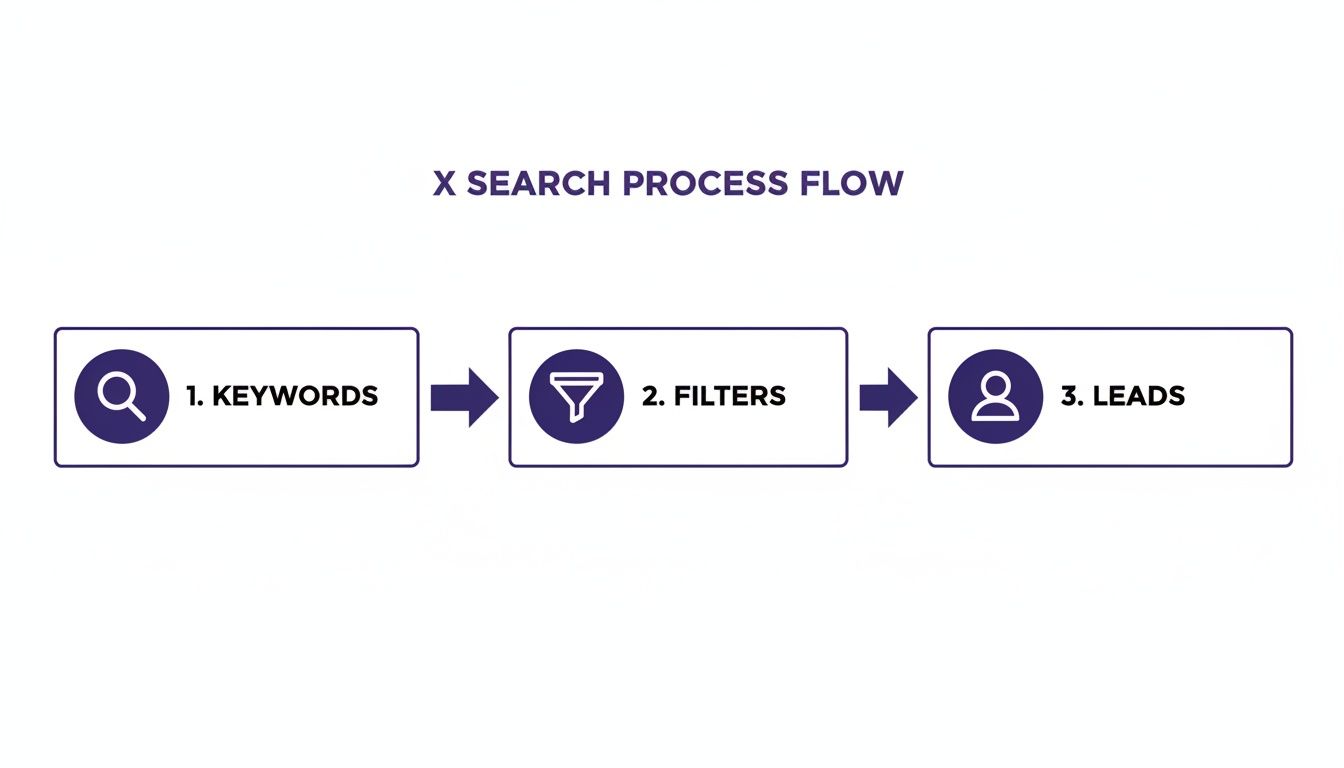
It’s a clear visual of the funnel—you start with your keywords, narrow things down with filters, and what comes out the other end is a high-quality list of potential leads for your SaaS.
How Automated Monitoring Works
Platforms like DMpro are designed to manage this entire workflow. You’re not just saving a search; you’re launching a dynamic monitoring task that constantly scrapes X for new opportunities. You set the criteria—keywords, exact phrases, negative keywords, user location, even follower count—and the system builds a fresh list of high-intent leads for you every day.
To get serious about scaling beyond X's native search, looking into the best social media automation tools is a must. These platforms offer a suite of features that save you from the manual grind.
The point of automation isn't just to save time on searching. It's to build a reliable, always-on system that delivers a fresh, curated list of prospects to you every single day.
This completely changes the dynamic. You stop reacting to conversations you happen to stumble upon. Instead, you're proactively building a pipeline of users who have already raised their hands and shown a need for what you offer. This is how you build a scalable distribution channel on X.
For founders who want to build these kinds of systems without getting bogged down in code, it's essential to understand these concepts. You can dive deeper into setting up these workflows in our guide on no-code automation.
The process usually breaks down like this:
- Define Your Target: Set up detailed filters for your ideal customer's bio, location, and follower count.
- Craft Your Query: Plug in the same powerful search strings you perfected using Advanced Search.
- Set the Schedule: Tell the tool how often to run the search—usually, this will be continuous.
- Review the Results: Get a clean list of qualified users delivered right to your dashboard, ready for outreach.
This approach frees you from the mind-numbing task of running the same searches over and over. It lets you put your energy where it actually counts—engaging with potential customers and closing deals.
Turning Keyword Finds Into Automated Outreach
<iframe width="100%" style="aspect-ratio: 16 / 9;" src="https://www.youtube.com/embed/gsPGdq2C97c" frameborder="0" allow="autoplay; encrypted-media" allowfullscreen></iframe>Finding that perfect tweet—where someone is practically begging for your product—is only half the battle. The real work is turning that discovery into a conversation that actually leads to a demo or a sale. This is where we bridge the gap between finding a user and starting a dialogue.
The secret is contextual personalization. A generic, copy-pasted DM is worse than no DM at all. Your first message has to feel like it was written just for them, and the easiest way to do that is by referencing the exact tweet that caught your eye.
Crafting the Perfect Opening Message
Let's say you find a tweet like, "Ugh, our current analytics tool is so clunky. Anyone have a recommendation for something more intuitive?" A lazy outreach attempt is just a generic sales pitch. A smart one leads with their pain point.
This is where outreach automation tools really shine. A platform like DMpro, for instance, lets you set up campaigns that automatically find tweets with your keywords and then send a personalized DM. You can create a template that still feels incredibly human:
"Hey [Name], I saw your tweet about looking for a more intuitive analytics tool. We actually built our platform to solve that exact problem after getting frustrated with clunky software ourselves..."
This approach nails two things at once:
- It proves you've paid attention and aren't just spamming blindly.
- It positions your product as the direct answer to a problem they just complained about.
This look at the DMpro dashboard shows how you can build a pipeline of leads using keywords and specific user criteria.
You can define precisely who you're targeting, turning a massive, noisy platform into a focused list of potential customers who are ready to talk.
Building a Seamless Lead-to-Conversation Pipeline
The end goal is to create a smooth, automated system that takes you from keyword monitoring straight to valuable conversations. When you set this up the right way, it runs quietly in the background, feeding you warm leads while you focus on building your product.
This isn't just about saving time; it's about building a predictable way to find new customers and scale your SaaS distribution.
A great setup will handle that first touchpoint for you, letting you jump in only when a lead shows genuine interest. This is why tools that combine scraping with outreach are so powerful. You aren't just finding leads; you're starting hundreds of relevant conversations every single day, completely on autopilot. If you're curious about the nuts and bolts, our guide on automated direct messages on X walks through the entire process.
By connecting your keyword search directly to your outreach, you create a system that spots intent and acts on it immediately. That speed is your edge. While your competitors are still scrolling through search results, your system is already in a potential customer's DMs, starting a conversation.
How to Scale Your Keyword Outreach Safely
Automation can be a founder's secret weapon, but if you're reckless, you’re asking for trouble. Scaling your keyword outreach on X isn't about blasting out as many DMs as possible. It's about building a smart, sustainable system that protects your accounts while pulling in a steady stream of leads.

The single biggest mistake I see founders make is trying to scale everything from one account. That’s a one-way ticket to getting flagged. The platform's algorithms are designed to catch unnatural, high-volume activity. Sending hundreds of DMs a day from one profile is a giant red flag.
Your goal is to make your automated outreach look as human as possible, even when a machine is doing the heavy lifting.
Smart Scaling Tactics
To keep your accounts in good standing, you have to think like the platform. This means spreading out your activity, mixing up your messages, and playing by the rules. It’s not just about dodging restrictions; it's about building an outreach system that will last.
Here's how to do it right:
- Rotate Multiple Accounts: Don't send 100 DMs from one account. Instead, send 10 DMs from ten different accounts. This keeps the volume per account low and makes your activity look far more natural.
- Use Spintax in Your Messages: Copying and pasting the exact same message over and over is a huge red flag for spam filters. Spintax is a lifesaver here. It lets you create multiple versions of your message in one template, so each DM comes out slightly different. For example,
{Hey|Hi|Hello}will randomly pick one of those greetings. - Respect Platform Limits: This is non-negotiable. Pushing the limits is a short-term play with long-term consequences. Applying solid web scraping best practices is essential for scaling safely and effectively.
The golden rule of safe automation is to make your scaled activity look as un-automated as possible. The more variety you can build in—across accounts, messages, and timing—the healthier your entire operation will be.
Platforms built for outreach automation often solve this problem for you. A tool like DMpro, for instance, is engineered with these safety features baked in. It automatically warms up new accounts, rotates outreach across all your connected profiles, and monitors activity so you never accidentally hit platform limits.
Getting familiar with the specific rules is a smart first move. If you want a deeper dive, check out our guide on the Twitter DM limit and how to work within it.
This isn't about trying to trick the system. It's about using automation intelligently to build a reliable lead-gen engine you can count on for years.
Frequently Asked Questions
When you start using X to find leads, a few questions always come up. Getting these sorted out early saves a ton of frustration and helps you build a system that actually works.
What's the Difference Between X Advanced Search and a Tool Like DMpro?
Think of X's Advanced Search as your manual reconnaissance tool. It's brilliant for one-off tasks—testing a new keyword, pulling a specific tweet, or just getting a quick read on conversations around a topic. It's your starting point.
A tool like DMpro is what you use when you're ready to scale. It takes those search queries that you know work and puts them on autopilot, 24/7. It's not just finding tweets; it's constantly monitoring for them, identifying the right people, and kicking off conversations with a personalized DM.
X Advanced Search is like fishing with a single rod to see what's biting. DMpro is like having a fleet of automated fishing boats out there, bringing in a steady stream of leads for your SaaS. One is for exploring, the other is for growth.
How Do I Make My Automated DMs Feel Personal and Not Spammy?
This is the make-or-break question. The answer is one word: context. Your first message has to reference the specific tweet or topic they were just talking about. Anything generic will be ignored or get you blocked.
Good outreach automation platforms are built for this. They use a few key things to make your outreach feel human:
- Personalization Tokens: These pull in details like the user's name automatically.
- Contextual Openers: Your message can start by directly referencing their tweet, like, "Saw you were looking for a new CRM..."
- Spintax: This lets you create variations of your message by rotating words and phrases (
{Hey|Hi|Hello}), so you avoid sending the exact same text over and over.
The goal is to prove you were actually paying attention. That's what turns a cold pitch into a relevant conversation.
Is It Safe to Automate Outreach on X?
Yes, but you have to be smart about it. The biggest red flags for X are sending a huge volume of DMs from one account in a short time or blasting out identical, copy-pasted messages. This is why using a platform designed for safe, scaled outreach is so important.
Look for features like multi-account rotation, smart scheduling that spaces out your messages to look more natural, and account warm-up sequences. For example, DMpro was built with these safeguards from the ground up to keep your accounts safe. It’s not about cheating the system; it’s about using tech to scale human-like interactions.
If you’re tired of manually sending DMs every day, try DMpro.ai — it automates outreach and replies while you sleep.
Ready to Automate Your Twitter Outreach?
Start sending personalized DMs at scale and grow your business on autopilot.
Get Started Free