
Instagram DM Automation: How It Works and What's Allowed
By DMpro team
Instagram DM automation explained: how workflows run, which contact paths Meta allows, the messaging limits to plan around, and when to hand off to a human.
You opened Instagram, saw a stack of comments on yesterday's post, and started typing the same answer again. A story reply from someone who wants a call sits unread while you copy a link into the tenth chat. That is the moment most founders reach for Instagram DM automation, and it is also the moment they get the job wrong.
A useful setup behaves like a receptionist with a script. Someone does something, a saved message goes out, and a rule decides what happens next. It is not a mail merge pointed at strangers. The useful question is not how many DMs you can push today. It is which conversations you are allowed to enter, and when a person has to take the chat back.
What Instagram DM Automation Actually Means
Say a follower comments "GUIDE" on a reel. A rule notices that word, sends a short DM with the link, and waits. If they reply with a pricing question, the chat goes to you. That is the whole shape of it.
Every setup has three parts.
- Trigger: Someone comments, replies to a story, clicks an ad, or sends you a DM.
- Message: The text, link, or question you prepared for that trigger.
- Next step: Wait, ask one more question, stop, or hand the chat to a person.
Official automation is not the same thing as bulk spam. The Instagram Messaging API overview describes a supported way for an app to send and receive messages between an Instagram professional account and customers, potential customers, and followers. Meta expects those automated chats to start by qualifying intent, and it requires a path to a human agent.
Where the law requires it, you disclose that the person is talking to an automated service at the start of the chat, after a long gap, and when a chat moves from a human back to automation. Meta also recommends telling people they are talking to automation even when the law does not force it, because that sets expectations. If you are still sorting what a DM even is on each network, this note on what a DM is on social media keeps the terms straight.
Treat the inbox as a customer-service channel with rules, not as a volume dial you turn up.
A compliant flow is built around a conversation the other person started, a clear bot disclosure, and a real handoff. Anything that only optimizes send count is the wrong product, even if the dashboard looks busy.
Which Contact Paths Make Automation Allowed
Automation fits a conversation the person started or agreed to. It never fits a cold message to a list you pulled from somewhere else.
| Contact path | How the conversation starts | Automation fit | Key limit |
|---|---|---|---|
| Customer messages you first | Customer sends the first DM | Good fit for replies and routing | Reply inside the open messaging window |
| Click-to-message ad | Customer clicks an ad and messages you | Good fit for follow-ups | A longer window can apply after that first message |
| Private reply to a comment | Customer comments on your post or reel | Fits comment-triggered replies | An hourly private-reply ceiling applies |
| Explicit opt-in | Customer opts in with a keyword or form | Good fit for sequences | Record consent and honor opt-outs |
| Cold DM from a scraped list | You message someone who never contacted you | Not supported | Conflicts with Meta's consent requirements |
Meta requires legally sufficient consent or opt-in before a business contacts people through the Instagram Messaging APIs. API access is built for Instagram Professional accounts, Business or Creator, linked to a Facebook Page. A personal profile sits outside that design, so "just connect my login" setups are out of scope before the first message is written.
The audit that actually matters
Consent rules are not the same in every country, and Meta leaves the lawful opt-in method to the business. Before any sequence is allowed to run, I'd ask three things of each conversation.
- Permission: Can you show they opted in or started the contact?
- Context: Does this message match what they did, or is it a pitch they never asked for?
- Exit: Is there a clear opt-out or a route to a person?
The metric worth watching is the share of chats with provable permission, valid context, and an exit. Reply rate alone hides a weak consent process, and automation makes that weakness louder. A weekly pass through compliance monitoring catches problems a send-count dashboard never will.
Random delays and a first name do not turn an unsolicited DM into an allowed one.
The same allowed-versus-workaround judgment applies elsewhere on the platform. A clear comparison of native Reposts versus third-party schedulers shows how quickly "it works" drifts from "it is supported." Pick the contact path first. Design the flow only after that path is allowed.
Instagram Messaging Limits to Plan Around
A follow-up that sends on day three after an ordinary chat went quiet is already dead on arrival. Most follow-ups have to land inside the standard response window of 24 hours that opens with the customer's last action. The click-to-message ad window of up to 7 days is why an ad-led sequence can run longer than a normal thread, so a day-three nudge is fine after that ad click and not fine after an ordinary conversation that stopped.
| Limit | Value | What it means for a sequence |
|---|---|---|
| Standard response window | 24 hours | Most follow-ups must land inside it |
| Click-to-message ad window | Up to 7 days | Follow-ups can run longer after an ad-led first message |
| Conversations API | 2 calls per second | Caps how fast conversation data is requested |
| Send API for text, links, reactions and stickers | Up to 100 calls per second | Highest throughput, but bursts to one thread still get throttled |
| Send API for audio or video | 10 calls per second | Media sequences need slower pacing |
| Private replies to comments | 750 calls per hour | Comment-triggered replies have an hourly ceiling |
| Private replies to Live comments | 100 calls per second | Live comment replies move fastest |
| Requests folder after inactivity | Excluded after 30 days | Older conversations drop out of API calls |
The Instagram Platform overview sets those ceilings per professional account, not as one global throttle a campaign can share: up to 100 calls per second on the Send API for text, links, reactions and stickers, 10 calls per second for audio or video, 750 calls per hour for private replies to post and reel comments, 100 calls per second for Live comment replies, and 2 calls per second on the Conversations API. The last row matters more than it looks. A re-engagement step aimed at request threads that went inactive a month ago will not fire through the API at all, so win-back logic belongs earlier in the flow.
What the ceilings change
Those numbers are ceilings, not targets. Meta warns that an app may be rate-limited when too many messages hit a single conversation, so a text flow with 100 calls per second of headroom can still get throttled if it dumps five steps into one thread at once. Pacing inside a conversation matters more than raw throughput.
Build the queue like this.
- Separate buckets: One limit bucket per professional account and per endpoint, since each has its own ceiling.
- One thread at a time: Serialize messages inside a conversation so two steps cannot collide.
- Backoff: On a throttle response, wait longer each retry instead of hammering the API.
- Watch the queue: Track queue age, delivery failures, and how full each account is.
API headroom is never permission to message people who did not opt in. The Meta Platform Terms require legally sufficient consent or opt-in before you contact people through the Instagram Messaging APIs. Plan every follow-up so it fits the window that contact path opened.
How an Automated DM Flow Runs From Trigger to Reply
A safe flow is a short checklist with a reason at each step, not a blast that hopes the platform looks away. Under Meta's messaging policy, the standard response window is generally 24 hours for most user actions, and up to 7 days when someone sends a first message after a Click-to-Direct ad. Follow-ups have to fit that window. Instagram also limits DM sending to reduce spam, and someone who keeps sending after a warning may temporarily lose the ability to send DMs. Forwarding one message is capped at five chats at once.
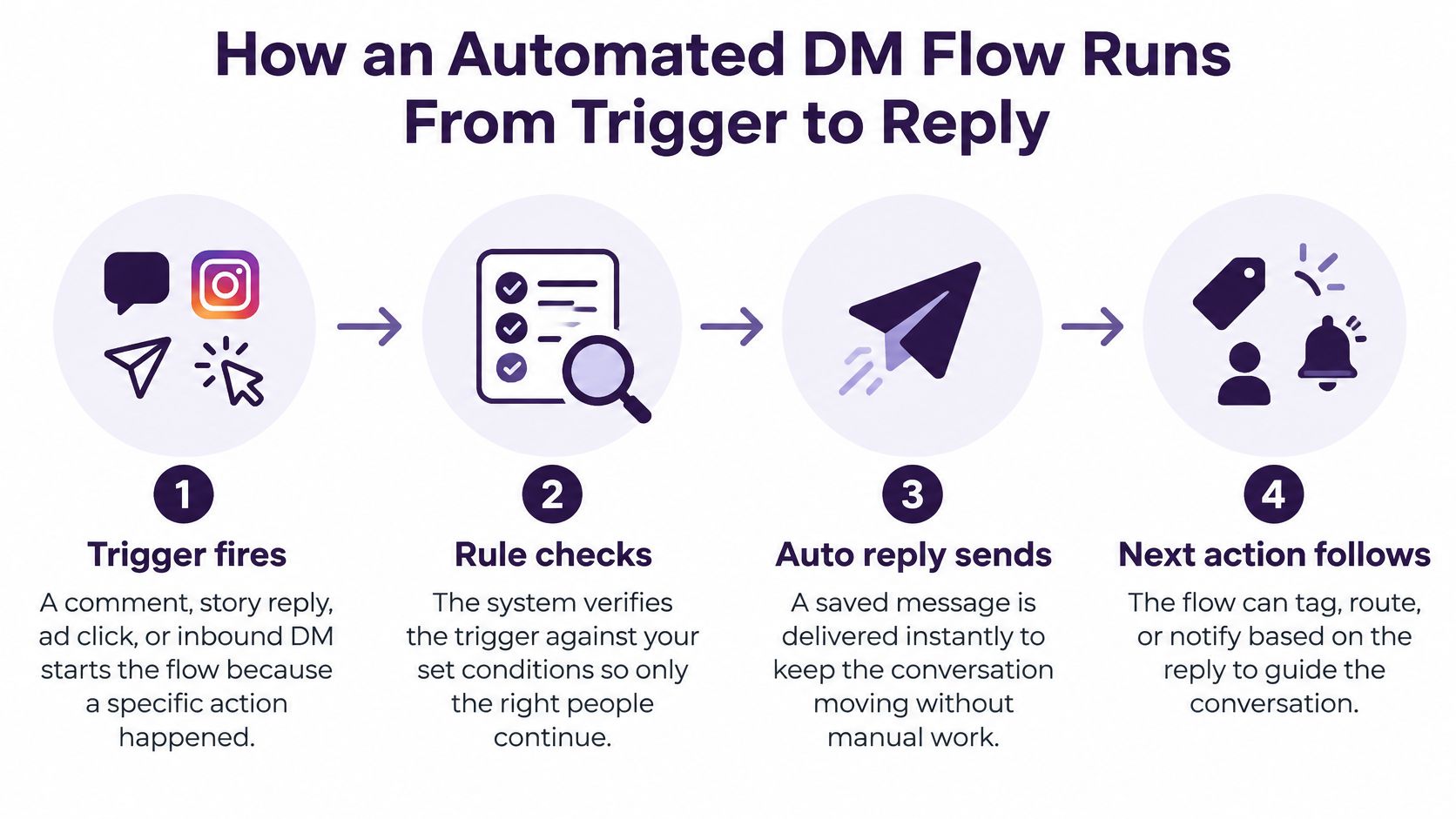
- Trigger fires. A comment, story reply, ad click, or inbound DM starts the run. Record which contact path it came from so later steps do not treat every chat as the same kind of permission.
- Check eligibility. Confirm that path is one you are allowed to automate and that any keyword or form opt-in is on file. If it is not, stop. Do not "send once and see."
- Queue the message. Put it in a per-account queue instead of sending the instant the trigger hits. Bursts aimed at one thread are how throttling starts.
- Send with pacing. Space messages with variable delays and stay inside the account's ceilings. If the platform returns a throttle, back off exponentially. Do not retry immediately.
- Wait for a reply. Hold the sequence for the window that path allows. A follow-up outside that window is not a clever nurture step. It is a message you are not allowed to send.
- Branch on the reply. If they answer, stop the follow-ups and route the chat into qualification or to a person. If they do not, send the next step on time. Either way, an opt-out ends the sequence immediately. On X, the same idea shows up in our own sending: when a prospect replies, DMpro pauses that person from further follow-ups so you can continue the chat manually in Twitter.
- Log and review. Per account, watch queue age, failed deliveries, throttle events, and whether people replied. A no-code automation builder is only useful if those controls are visible, not buried.
The reply check is what makes the flow safe. The send count is not.
No tool can promise you will never be restricted. Pacing, consent, and a stop on reply are the controls that match how the platform behaves. If you want the logic without writing code, build the branch first and the copy second.
When Automation Must Hand Off to a Human
A customer writes "this charge is wrong, I want a refund." The bot answers with a sales link and a cheerful "here is 10% off." They leave, and they tell someone else. That failure is why a handoff exists.
The Instagram Messaging API requires automated experiences to provide a path to a human agent. Where the law requires it, you also disclose automation at the start, after a significant lapse, and when a conversation moves from a human back to automated handling. API calls do not return Requests-folder conversations that have been inactive for 30 days, so a dashboard can appear complete while an older, high-intent chat is missing.
Move the chat to a person when you see any of these.
- Buying signals: Price, booking, or trial questions.
- Complaints: Refund language, anger, or a broken order.
- Sensitive topics: Anything you would not want a script to guess at.
- Low confidence: The bot is unsure, or the question was not in the script.
- Stuck loop: Two questions in a row went unanswered.
What the person needs on arrival
Pass a short summary, not the raw transcript dump. Who they are, what they asked, what the bot already promised, and when they last wrote. Without that, the agent restarts the chat and the customer repeats themselves.
Measure four things, not vanity send totals. Handoff rate shows how often the script gives up, which is healthy when complaints spike. Time to a human shows whether the path is real or a hidden menu. Unresolved-conversation rate shows chats that died in the bot. Recovery rate shows whether you brought back threads that went quiet or aged past the retrieval boundary.
Hybrid support is the setup I would trust. Automation qualifies intent and answers the routine questions. People handle the exceptions. Fully hands-off DMs look efficient until the first angry customer meets a discount code.
Three Realistic Setups and How They Hold Up
A business coach runs a comment-to-DM lead magnet. A follower comments a keyword, a private reply sends the guide and asks one qualifying question, and any follow-up stays inside the window that comment opened. Pricing questions go to the coach with a one-line summary. Verdict: this passes because the follower started the contact, and the only change worth making is a written opt-out in that first DM.
An online shop runs a click-to-message ad. The first message from the customer opens the longer ad window, so the bot can ask about size and budget and mention a discount, then stop the moment they opt out. Verdict: this passes because the ad click plus their message is the consent signal, and the one change is to store that opt-out so the next campaign cannot revive them.
A recruiter wants to message profiles scraped from search. There is no comment, no ad click, and no form. Verdict: this fails the consent test, and the fix is a post or form that invites candidates to opt in, then the same qualifying flow only for people who respond.
Comparing the best Instagram direct message automation tools helps you see which builders support comment replies and handoff. None of them make a scraped list legal. If those opted-in Instagram chats later need an X follow-up, keep the two networks separate, the way this Instagram to Twitter walkthrough treats the handoff between channels.
Confirm Your Setup Before You Switch It On
Do not flip the switch because the preview looked fine. Run this as a go or no-go. Any miss means you fix it before launch.
- Account type. Confirm an Instagram Professional account, Business or Creator, linked to a Facebook Page.
- Contact path. Every source of chats is an allowed path, with a consent record you can show.
- Disclosure and a person. Each opening message says automation is in use and offers a route to a human.
- Window. Each follow-up fits the window that path opened, including the longer one only for ad-led chats.
- Queue. Per-account pacing and backoff are on, not a single global blast setting.
- Handoff. Triggers and a summary template exist, and someone is watching them.
- Dashboard. You can see handoff rate, unresolved chats, opt-outs, and delivery failures.
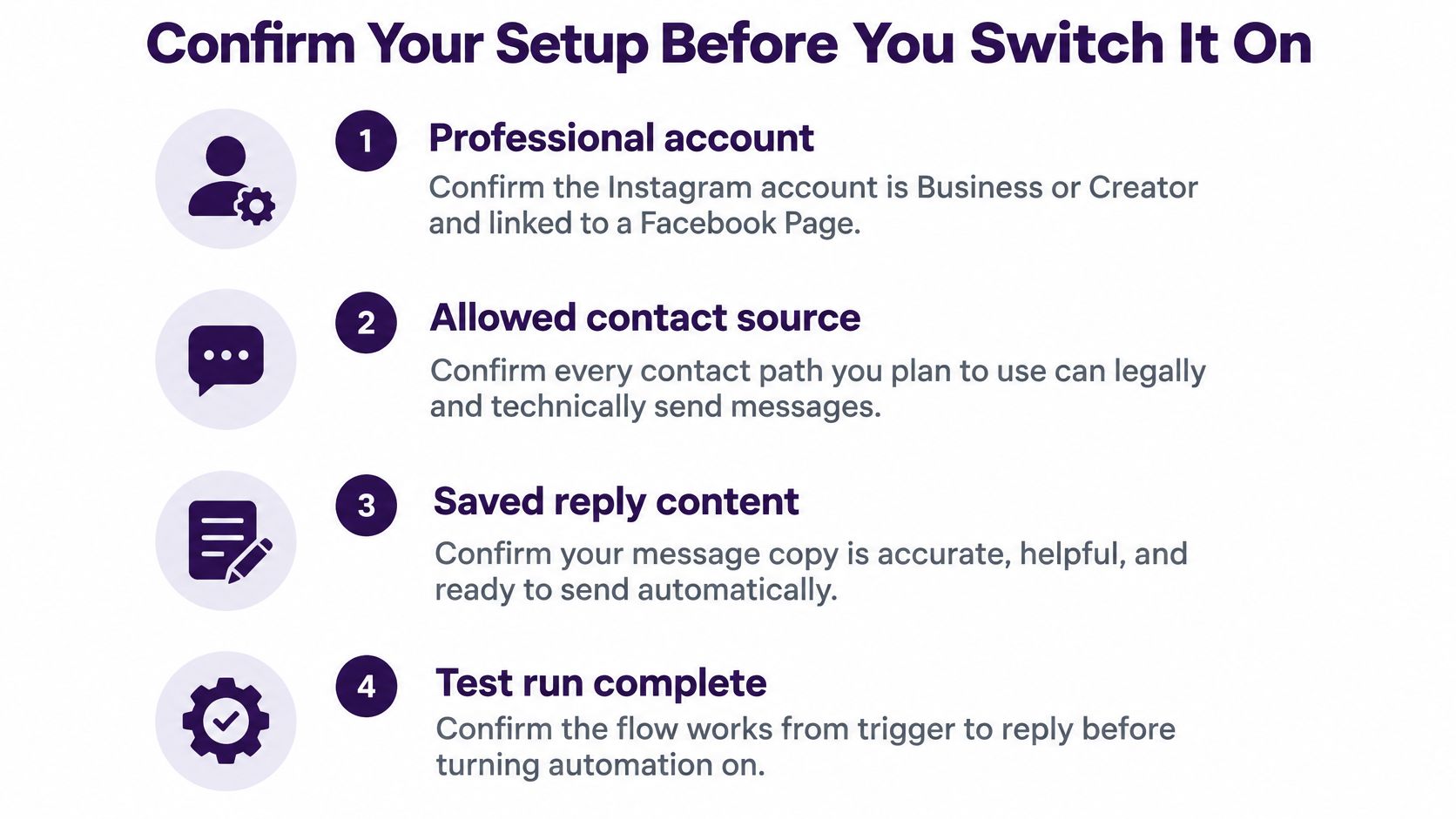
If item 2 fails, nothing else matters. I would rather ship one comment-keyword flow that passes this list than five clever sequences that message people who never raised a hand. Cold outreach belongs on a network whose rules you have set the workflow to follow. DMpro automates cold DMs on X (Twitter) that get replies, which is a different channel from this Instagram inbox, and it still only works when you respect that platform's limits.
Instagram rewards the chat someone started. X is where a lot of founders still need a steady outbound habit without living in the compose box. DMpro automates cold DMs for that X workflow, with replies pausing the sequence so you can take over. If your Instagram paths are clean and you want the same discipline on X, try DMpro.ai and keep every send inside the rules you just checked.
Put your outreach plan into practice
Find relevant leads on X (Twitter), personalize your messages, and manage the replies in DMpro.
Get started