
Multiple Twitter Accounts: How to Set Up and Stay Safe
Learn how to create, separate and manage multiple Twitter accounts for outreach safely, with setup steps, pacing limits and consent rules for 2026.
You've got a founder account, a company account, and a growing list of people who might need your SaaS. Opening another account feels like the obvious way to reach more prospects, until your team starts contacting the same people and nobody knows which handle owns the conversation.
Multiple Twitter accounts work best when each has a different job. Before you connect another sender, decide who it serves, what it contributes, and who's responsible when something goes wrong. That's a better foundation for distribution than spreading the same campaign across more handles.
Choosing Purpose-Driven Accounts and Keeping Them Different
Start with one test: does this account have a job no other account already does?
Legitimate reasons to split accounts and what must differ
| Reason | What Must Differ | Red Flag |
|---|---|---|
| Separate brand and founder voice | Bio, topics and tone | Same post copied to both accounts |
| Different target segments | Audience list and message angle | Same prospect list loaded into every account |
| Different languages or regions | Language and local context | Translated duplicates of one message |
| Client or team member ownership | Owner, content plan and schedule | One operator running several identical accounts |
| Campaign-specific outreach | Offer, timing and copy | Interchangeable senders pushing one offer |
X's authenticity policy allows up to ten accounts for different, non-duplicative purposes, but prohibits coordinated amplification and substantially similar content. The count alone isn't the problem. What matters is whether the accounts serve independent purposes or behave like interchangeable distribution channels.
Say you sell customer-support software. Your founder account could discuss hiring support leaders and making product decisions, while the company account publishes release notes, tutorials, and service updates. Those accounts have different editorial jobs even though they support the same business.
A regional account needs more than translated copy. Give it relevant customer examples, local events, terminology, and someone who can answer audience questions. If you can't maintain that context, keeping the conversation on your main account may be the better trade-off.
Make the differences visible in daily work
Write a separate editorial brief for each handle. Include its audience, recurring topics, examples, offer framing, and the conversations it should leave to another account.
Your profile should communicate that distinction before anyone reads a DM. Use a Twitter profile template to organize the essentials, then write the bio around that account's actual role rather than copying your main profile.
Operational ownership matters just as much as positioning. For agencies managing work across platforms, Linkboost's guide to build a repeatable LinkedIn agency process is a useful companion for thinking through repeatable handoffs. Keep X-specific account boundaries and outreach rules in your own operating checklist.
X's automation rules prohibit automating accounts for duplicative or substantially similar purposes, as well as posting substantially similar content across accounts. Replacing words with synonyms doesn't create a different message or use case.
Use these boundaries:
- Separate prospect queues. Assign each eligible prospect to an account before scheduling outreach, rather than loading the same list everywhere.
- Audience-led publishing. Choose topics, formats, and posting times around each audience, not a synchronized network schedule.
- Independent engagement. Don't coordinate likes, replies, reposts, or poll participation, and don't use one account to boost another.
Read the latest posts and planned DMs from your accounts side by side. If the senders feel interchangeable, rewrite the plan before sending.
Different voices create more editorial work. That's the trade-off: you gain a more relevant account for a specific audience, but you also take on another publishing schedule, inbox, and set of responsibilities.
Before keeping any extra account, answer this: what does it say or do that the others don't?
How to Set Up Each Account Step by Step
Set up each account as something another teammate could understand and recover without guessing. A profile that looks complete but has unclear ownership isn't ready for outreach.
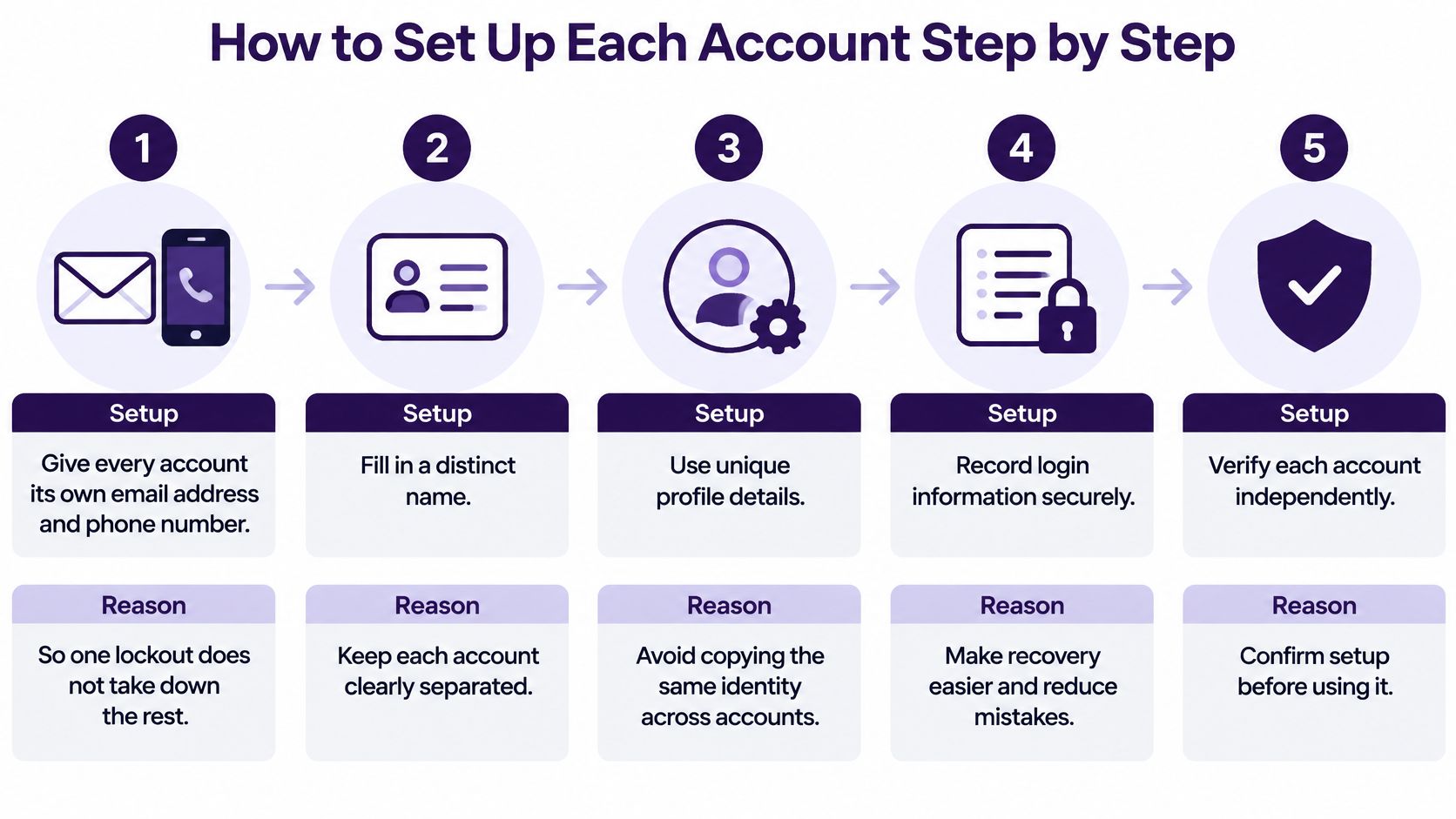
Establish identity and recovery
-
Give every account its own email address and phone number. Use contact details your business controls and record who can access them, so losing a teammate's personal login doesn't create a recovery problem. Separate recovery details reduce shared dependencies, though they don't guarantee that enforcement on related accounts stays isolated.
-
Complete a distinct name, photo, bio, and location. Match the identity to the account's purpose and represent the person or business accurately. A founder should look like a founder, while a regional support account should clearly identify its region and function.
-
Write a purpose statement. Describe the audience, topics, and what the account will never post in a short paragraph. For example, a product-support account might explain features and troubleshoot questions but never send sales pitches.
Keep credentials in a password manager rather than a shared spreadsheet. Record recovery ownership alongside them, and verify that the assigned owner can complete the account's security checks.
If you're mapping existing recovery dependencies, the HarvestMyData guide to phone-linked social accounts provides useful context. Keep that review focused on accounts your business owns or is authorized to manage.
Prepare the account for actual conversations
-
Establish ordinary activity before outreach. Browse relevant discussions, publish useful posts, and write substantive replies on the account's topics. Treat this as establishing a credible presence, not a ritual that guarantees permission to automate or protects against restrictions.
-
Connect the account to your outreach workflow. At DMpro, we connect accounts through a secure browser extension that imports your Twitter session, so no password sharing is required. You can add, rotate, and share connected accounts with team access from one place, while keeping ownership clear.
-
Check readiness before launching. Confirm that login works, verification prompts are resolved, and there are no warnings requiring attention. Then inspect the selected sending handle and campaign settings together so you don't launch from the wrong identity.
Ready means understandable: a complete profile, genuine posts, accessible recovery details, and a purpose you can explain in a sentence.
Don't confuse an established-looking profile with a qualified prospecting channel. The account still needs an appropriate audience, a legitimate reason to contact people, and an operator who can handle replies.
Pacing Limits That Keep Accounts Safe
Platform limits and spam signals for multiple accounts
| Signal | Platform Rule | Practical Habit |
|---|---|---|
| DMs per account per day | Technical ceiling of 500 across web, mobile and API | Stay well below it and treat it as a ceiling, not a target |
| Identical copy or links | Can be reported as spam before the ceiling is reached | Write genuinely relevant messages rather than rotating synonyms |
| DM spam block | Sending can be blocked temporarily | Wait at least 30 minutes without trying another DM |
| Same recipient across accounts | Not controlled by per-account limits | Cap total messages per person across all accounts |
| Sudden volume jump | No universal safe ramp-up is published in the cited limits | Increase cautiously and review account signals |
X's published limits set a ceiling of 500 DMs per account per day, shared across web, mobile, phone, and API activity, and advise that a spam-related block may require at least 30 minutes without another DM attempt before trying again. Neither figure gives you a recommended sending target or guarantees that sending will resume afterward.
Duplicate messages and repeatedly sending the same link can cause problems before you reach the technical ceiling. Changing a greeting while keeping the same pitch and destination isn't a meaningful fix.
Measure exposure, not just sends
Say a prospect hears from your founder account, a sales account, and a campaign account. Each sender might stay below its own limit, but the recipient still experiences repeated outreach from your business.
Per-account capacity isn't per-recipient permission. Track the person's total exposure, including pending follow-ups, rather than treating each handle as a fresh opportunity.
Start with a small, manageable queue of eligible conversations. Increase only when you can review replies, complaints, blocked sends, and operator workload without losing control. Don't schedule automatic increases just because an account has existed longer.
The practical Twitter DM limit guide can help you distinguish technical capacity from campaign settings. For a different platform perspective on repetitive growth tactics, SCHelper's follow-unfollow guidance for SoundCloud artists is a useful comparison, not a source of X rules.
Pacing rule: if sending activity is growing faster than your ability to review conversations and account signals, slow down.
Consent and Opt-Out Rules Across Accounts
A stop request belongs to the whole operation, not just the inbox that received it. If someone opts out through a founder account, another operator shouldn't contact them through the brand account.
X's developer restrictions require explicit consent before automated messages or replies, immediate respect for opt-outs, and accountability for authorized third-party applications. Being able to send someone a DM, or having them follow you, doesn't by itself establish consent for automated outreach.

Make suppression operational
A shared do-not-contact list needs to control sending, not just document objections after the fact. When an opt-out arrives, suppress the recipient immediately and cancel queued follow-ups across the relevant operation. If synchronization fails, pause sending rather than relying on an end-of-day update.
Put these controls on the launch checklist:
- Consent record. Store what the recipient requested, where they indicated consent, and which communication it covers.
- Identity review. Match account identifiers where available, and send ambiguous handles or suspected duplicates to a human.
- Recipient-level cap. Count messages across senders and campaigns, including scheduled follow-ups.
- Audit trail. Record the sending account, recipient, message, time, and suppression changes.
- Named owner. Assign complaints and escalations to a person, with written responsibilities for each client account.
Label automated accounts and identify their associated human-managed account so people know who answers for them. Use a compliance-monitoring checklist to keep these responsibilities visible during campaign reviews.
Run a monthly comparison of suppression records against messages sent. Investigate exceptions instead of assuming that a populated CRM field means every operator and campaign respected it.
Monitoring Account Health and Responding to Restrictions
A backup account isn't a recovery plan for a restricted sender. Switching handles to continue the same activity can turn an account problem into an operation-wide problem.
X's platform-manipulation reporting distinguishes legitimate specialized accounts from duplicative networks and coordinated attempts to bypass limits or artificially amplify messages. Monitoring needs to cover both individual handles and shared behavior.
Check before sending, not just after trouble
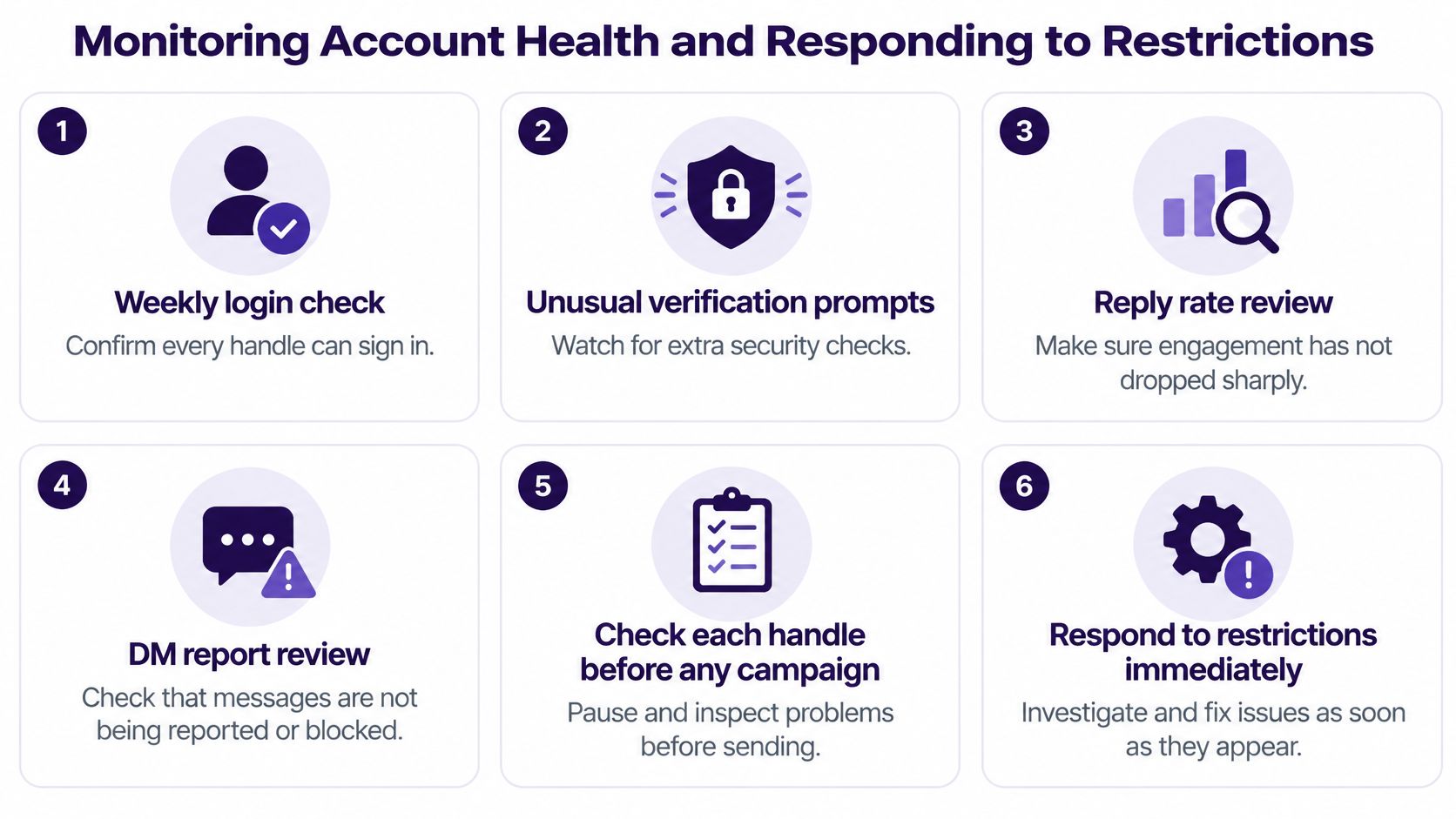
Run a weekly review of login access, unusual verification prompts, reply-rate changes, and reported or blocked DMs. Check each handle again before a campaign, because yesterday's status isn't enough to approve today's sending.
DMpro campaign senders are connected X profiles. Confirm the handle and account health before use, rather than approving a campaign by name alone.
Use this first-response checklist:
- Sudden reach drop. Pause new DMs and review recent copy and activity. A drop alone doesn't prove a restriction.
- Repeated sending blocks. Stop repeating the link or message and inspect the affected queue before rewriting.
- Restriction notice. Pause that account. Don't switch to a backup to continue the same outreach.
- Verification prompt. Complete it on the account itself, then confirm normal access before resuming.
- Suspension. Appeal through X's channels, preserve sending records, and pause the rest of the operation until you understand the cause.
Log the account, date, message copy, recipients affected, and response taken. The X account suspension guide can help organize your response.
No tool guarantees safety. DMpro's safeguards reduce risk but don't override X's rules, and DMpro isn't responsible for restrictions resulting from use of the service. Your business remains responsible for its activity.
Pick Your Account Setup This Week
Don't launch a collection of new senders. Choose an account you can justify, operate, and review properly.
Make these decisions this week:
- Choose a purpose. Write why the additional account should exist and what useful work it will do independently.
- Prepare the identity. Build a distinct profile, secure its recovery details, and establish relevant public activity before considering outreach.
- Agree on sending controls. Assign responsibility for consent, suppression, recipient exposure, and campaign approval before anything enters the queue.
The order matters. Purpose determines the profile and audience; those choices determine what conversations are appropriate. Automation should execute that plan, not substitute for it.
If you're preparing to automate outreach across several accounts, our getting-started process is straightforward: sign up, connect a Twitter account through the secure browser extension, create your first campaign, and begin generating leads. Review the sending identity and eligible audience before launching.
Keep the first campaign narrow enough to inspect individual conversations. You'll get a clearer basis for deciding whether another account is useful or just adds work.
DMpro brings lead collection, personalized messages, and campaign sending into one workflow for managing multiple Twitter accounts. Visit DMpro to try automating cold DMs, while keeping automated sending limited to recipients who've explicitly consented and honoring opt-outs across your operation.
Ready to Automate Your Twitter Outreach?
Start sending personalized DMs at scale and grow your business on autopilot.
Get started