
Discover am i shadowbanned on twitter: Quick checks to regain visibility
Wondering am i shadowbanned on twitter? Find signs, simple checks, and proven steps to restore visibility and boost engagement.
Spotting A Shadowban Quickly
Ever hit “Tweet” only to hear crickets? As a SaaS founder relying on Twitter for lead generation, you can’t afford to lose visibility. If your hashtags aren’t popping up or replies vanish, you might have tripped Twitter’s invisible filters—shadowbanning. Catching these issues early can save hours and keep your outreach automation on track.

Try these quick reality checks:
- Search your latest tweet’s hashtag in an incognito window. Zero results usually point to a search ban.
- Drop a reply on a busy thread, then switch accounts or log out. If it disappears, you’re likely facing reply deboosting.
- Peek at Twitter Analytics and spot a 50% week-over-week drop in impressions. That steep decline often signals a visibility filter.
If you track your Twitter lead gen with tools like DMpro, you’ll see these drops flagged in your dashboard.
Quick Shadowban Test Summary
Here’s a handy overview of the core checks you can run in under a minute. Each points you toward the right next move.
| Test | Indicator | Action |
|---|---|---|
| Hashtag Search | No results in incognito | Retest in a clean session |
| Reply Audit | Reply doesn’t show on another account | Capture a screenshot |
| Analytics Check | 50%+ impression drop | Record the timeframe |
These quick checks help keep your SaaS distribution humming and protect your outreach automation from hitting roadblocks.
Understanding The Types Of Twitter Shadowbans
Shadowbans aren’t random glitches—they’re silent filters that throttle your reach. For a founder scaling SaaS distribution or running cold-outreach pipelines, that lost visibility means missed leads.
In practice, four distinct restrictions can quietly limit your reach. One day your branded hashtag shows up everywhere. The next, it’s gone. Analytics often reveal the truth: impressions slashed in half, follower growth grinding to a halt, engagement rates dropping from 2% down to 0.5% almost overnight. Learn more in TweetArchivist’s guide to shadowban testing.
At their core, these filters decide who sees your content—and who doesn’t.
- Search Suppression hides tweets containing specific keywords from search results and hashtag feeds.
- Reply Deboosting tucks your responses under “Show more replies” or removes them entirely.
- Timeline Restriction prevents followers from seeing your tweets in their main feed.
- Profile Suggestion Removal stops your account from popping up in “Who to follow” recommendations.
One founder discovered her branded hashtag—used consistently for weeks—had vanished from incognito searches. Her impressions plunged by 50% in just 24 hours. She cross-checked lead-gen stats and DM open rates in DMpro to confirm the drop.
Comparison Of Shadowban Types And Effects
| Shadowban Type | Metric | Typical Drop |
|---|---|---|
| Search Suppression | Hashtag Search Visibility | 80% Reduction |
| Reply Deboosting | Reply Impressions | 60% Drop |
| Timeline Restriction | Home Timeline Impressions | 50% Fall |
| Profile Suggestion Removal | Follower Growth Rate | Near-zero Increase |
Pair these checks with your Twitter lead generation strategy so you can pivot fast.
A consistent slide in home timeline impressions usually points to a timeline restriction rather than organic fluctuation.
Detect And Respond To Each Filter
- For Search Suppression, open an incognito window or ask a colleague to search your hashtag.
- To test Reply Deboosting, reply to a high-traffic tweet and view it from a nonfollower account.
- If Timeline Restriction seems likely, compare your home timeline impressions against mention streams in analytics.
- When you suspect Profile Suggestion Removal, track daily follower counts and watch for any flatlining.
You can automate daily visibility checks with DMpro to catch issues early.
Next, we’ll walk through hands-on testing techniques using incognito searches and third-party tools to confirm these restrictions in real time.
Testing Search And Timeline Visibility
When you suspect a shadowban, nothing beats a hands-on check. Open an incognito window or borrow a colleague’s account to see what a fresh viewer encounters.
- Search your username privately and note if recent tweets show up.
- Try a unique hashtag from your last post to verify search visibility.
- Drop a reply in a busy thread, then sign out and hunt for it again.
This quick reality check often reveals search bans or reply deboosting before you dive into more advanced tools.
“When I opened incognito and saw my replies vanish, alarms rang,” says Alex, a SaaS founder who tracked each missing reply.
Setting Up Each Manual Test
First, clear your cookies or switch to a private window. That wipe ensures you’re not seeing cached results.
Next, ask someone who doesn’t follow you to search your handle. If they can’t find your tweets, it’s a red flag.
For timeline visibility, keep an eye on your home-feed impressions via analytics. Watch for sudden dips over a few hours.
Short logs and screenshots make patterns clearer than one-off glitches. Run tests on both desktop and the mobile app to rule out device quirks.
- Desktop Incognito captures browser-based visibility.
- Mobile App Logged-Out view checks in-client filters.
- Colleague’s Account simulates a fresh session.
- Analytics Log highlights timestamped dips.
Shadowban Decision Tree
Below is a visual guide showing which test uncovers each shadowban type.
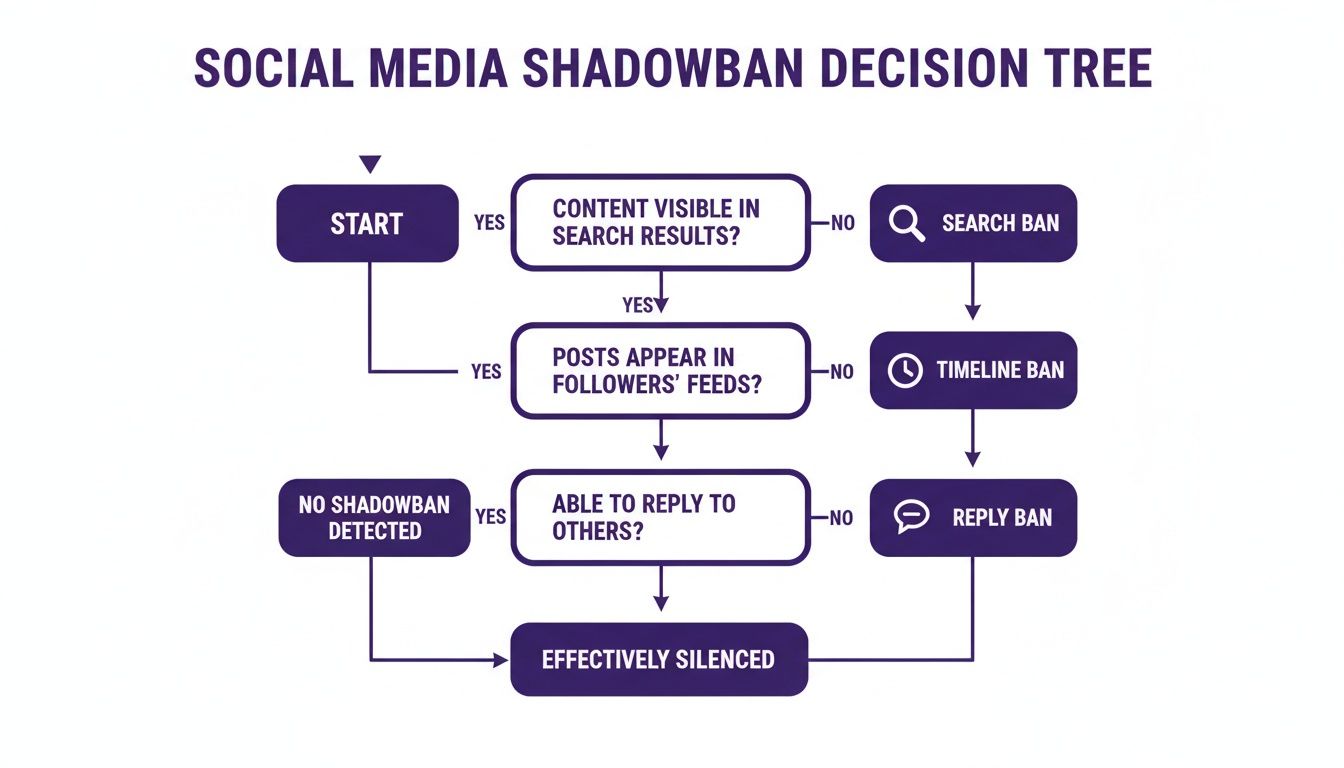
A failed hashtag search points to a search ban, missing replies mean reply deboosting, and no tweets in your home feed signals a timeline ban.
Check out our guide on Twitter account analytics for more detailed metric tracking and trends.
Documenting Tests And Capturing Evidence
Consistency is key. Run these tests daily for clear trends.
- Save screenshots with timestamps after each trial.
- Note whether you used incognito, mobile app, or a friend’s account.
- Keep a simple log of date, test type, and outcome.
Solid data not only highlights issues but also strengthens your case when appealing. For ongoing alerts, try tools like DMpro.ai to schedule checks and notify you when visibility dips.
Also, compare your @mentions feed in an incognito search. If mentions look normal but your home timeline is empty, you’re likely under a timeline filter.
- Contrast @mentions with home timeline to isolate filters.
Running Tests With Incognito Accounts And Tools
Sometimes a quick look at your own profile isn’t enough to answer “Am I shadowbanned on Twitter?”
That’s when you call in fresh eyes and dedicated tools. Invite a teammate to log in from a brand-new account. They’ll spot missing tweets or replies you might overlook on your own.
Popular Shadowban Detector Tools
Automated sites and services scrape current filter lists to show where your posts land. Here are a few reliable picks:
- ShadowbanCheck: Scans search and reply visibility in under 30 seconds
- TweetReach: Delivers detailed engagement reports and timeline insights
- Keyhole: Tracks impressions with daily trend charts
Insight: These tools flag sudden visibility drops almost instantly, so you can pivot right away.
| Tool | Primary Feature | Price Range |
|---|---|---|
| ShadowbanCheck | Search & Reply Scan | Free |
| TweetReach | Engagement Analysis | $9–$199/mo |
| SocialEyes | Hashtag Visibility | Free/Paid |
Automated Browser Extensions
If you’d rather see indicators right in your feed, browser add-ons can help. Try these:
- SocialEyes highlights blocked keywords in hashtags
- VisibilityGuard shows reply status on each tweet menu
They run in normal and incognito windows, making it easy to jump between accounts.
For deeper dives, analytics dashboards catch trends that simple filters miss:
- Grafana (grafana.com) dashboards to track engagement drops over custom timeframes
- Brand24 (brand24.com) email alerts when audience metrics dip unexpectedly
- Tweet Binder (tweetbinder.com) compares your mentions feed versus your home feed
Cross-checking two or more sources nails down whether a block is real. And if you need to test dozens of logins at once, you’ll appreciate a multi-session tool. Check out our guide on multi-account management with DMpro to juggle different logins seamlessly.
Combining Manual And Automated Tests
Pair incognito searches with automated scans for a clear verdict fast.
- Do an incognito search after each tool report
- Verify replies by asking a colleague to check for you
- Log every result in a simple spreadsheet for patterns
When search results drop to zero and your analytics line dips in sync, you’ve got proof. This blend of human checks and software cuts down on false alarms—and helps you decide which tools deserve your budget.
Test Collaboration With Teammates
Running tests together can spot oddities faster.
- Share your screen while someone else runs a visibility check
- Compare desktop and mobile results side by side
- Timestamp any weird gaps so you can track them over time
If you’re on a team, tools like DMpro’s health monitor let everyone receive the same alerts. That way nobody misses a crucial change in your account’s status.
Analyzing Results And Lifting Restrictions
After you’ve gathered your analytics, the next move is to decode what those numbers really mean for a recovery plan. Scan your impressions graph for any sudden dives—those often sync up with shadowban filters. Take a closer look at daily replies over the last week. Then cross-reference follow-unfollow spikes—they tend to trigger restrictions.
Reading Key Metrics
Watch for these red flags:
- Impression Variance: A drop of 50% or more within 48 hours
- Reply Count: Significant dips below your average reply rate
- Follow Actions: Exceeding 100 follows or unfollows in a single day
Pair these metrics on the same timeline to spot alignment between activity bursts and visibility losses.
Common Shadowban Triggers And Thresholds
Below is a quick guide to the most common behaviors that draw Twitter’s attention—and how long you might face a restriction.
| Trigger | Threshold | Likely Restriction Duration |
|---|---|---|
| Rapid Follow/Unfollow | >100 actions per day | 48–72 hours |
| Repetitive Hashtags | >5 uses per hour | 48–72 hours |
| Flagged Content | Community reports | Multi-week |
For more detail, check Whoer’s blog.

Key Takeaway: As soon as you spot a plunge in visibility, ease off high-volume actions to prevent longer restrictions.
Lifting Restrictions
- Disable any automation and let the filter period run its course.
- Clean out tweets packed with repetitive tags or flagged keywords.
- Diversify your feed with genuine replies, thoughtful quotes, and retweets.
- Spread out actions and aim to climb back above 80% of your normal impression levels before ramping up again.
Check out our guide on deleting and archiving problematic tweets:
https://www.dmpro.ai/blog/delete-tweets-archive
Monitoring Ongoing Health
Regular check-ins keep you one step ahead of hidden filters.
- Set alerts for any impression dip over 20%—that flag means it’s time for a quick review
- Compare your mention stream to timeline metrics to spot inconsistencies
- Rotate content types every few days to keep the algorithm engaged
Consider using DMpro.ai’s real-time health monitor to automate these alerts and tackle issues early. Growth in this space isn’t a sprint—it’s a series of small, steady wins.
Best Practices To Prevent Shadowbans
Whenever you catch yourself asking “am i shadowbanned on twitter,” lean on these daily routines. They’ll help you avoid filters and maintain steady visibility for your lead-gen and outreach automation.
- Space out follows and unfollows to 50 actions or fewer per hour.
- Rotate hashtags so you never use more than 3 different tags in a single tweet.
- Mix genuine, off-the-cuff replies with scheduled outreach to dodge spam flags.
- Limit bursts of DMs or mentions, keeping your activity at a natural pace.
- Watch for sudden dips of 20% or more in your analytics each day.
Rotate Hashtags And Content Types
Switching up hashtags every few tweets helps you dodge algorithmic fatigue and search bans. One founder ran a drip-style campaign that swapped tags every 24 hours. Replies kept rolling in and search results stayed clear.
Changing up your tag game stopped a ban before it started.
Mix Automation With Manual Engagement
Smart automation can handle repetitive tasks without tripping Twitter’s filters. DMpro.ai’s drip-style direct messaging spaces out DMs, rotates accounts, and stays well under risky thresholds. Pair that with genuine, manual replies for stronger community ties.
Learn more about refining this blend in our article on Twitter Marketing Strategies.
Monitor And Adjust Outreach Cadences
Start each morning by reviewing your outreach calendar. A sudden spike in messages or follows can catch Twitter’s eye. Use a simple spreadsheet or DMpro.ai’s dashboard to track your pacing.
| Activity | Safe Volume | Frequency |
|---|---|---|
| Follows/Unfollows | 50 per hour | 4–6 times/day |
| Tweets | 5 per hour | Up to 40/day |
| DMs | 20 per hour | 200/day max |
If you spot a 30% drop in replies or engagement, ease off immediately. Staying within these thresholds keeps you out of hot water. Weekly alerts from your analytics dashboard make this process painless.
If you’re ready to automate without losing that human touch, try DMpro.ai — it handles outreach and replies while you focus on big-picture strategy.
FAQ
If you suspect you’re shadowbanned on Twitter, don’t panic. Most shadowbans lift within 48–72 hours, so give it a little time.
Can you appeal to Twitter Support?
Absolutely. Collect screenshots or analytics that show a clear drop in impressions. Then file a help ticket with your data and search test results.
Will switching devices or clearing cookies help?
It’s worth testing. Open an incognito window or try another phone. If your posts reappear, the issue isn’t account-wide but tied to your device or browser cache.
What if these steps don’t reveal anything?
A detailed log of your manual tests and reports from third-party tools can strengthen your appeal.
Quick Check Steps
- Open an incognito browser or switch to a different device
- Ask a colleague to search for your handle
- Run a free shadowban checker for a quick sanity check
- Review Twitter Analytics for any sudden impression dips in the last 24 hours
Real-world example: A founder paused an overzealous follow/unfollow strategy and saw a 60% drop in impressions. Four days later, as the ban lifted, their numbers bounced right back.
Will clearing cookies speed up recovery? Clearing cookies resets cached views but won’t lift a ban. It simply tells you if cached data was hiding your tweets.
Will changing networks help? Sometimes a different IP—like switching to mobile data or another Wi-Fi—can bypass network-level restrictions.
If you’re tired of manually sending DMs every day, try DMpro.ai — it automates outreach and replies while you sleep.
Ready to Automate Your Twitter Outreach?
Start sending personalized DMs at scale and grow your business on autopilot.
Get Started Free