
A Founder's Guide to Twitter Bot Makers
Discover how to build a Twitter bot maker for lead generation. This guide covers API setup, AI personalization, and when to use tools like DMpro.ai.
So you're thinking about building a custom Twitter bot for lead generation? It's a smart move. Doing it yourself gives you total control over your outreach, ditches the monthly subscription fees, and creates a real, scalable asset for your SaaS. But let's be honest, founder-to-founder—this is a lot more than just whipping up a simple script.
Why Build a Custom Twitter Bot Maker
The allure of creating your own automated outreach engine is strong. You get to set every rule, fine-tune every message, and build a system that's perfectly engineered to find your ideal customers on X (formerly Twitter). Think of this guide as your complete roadmap to getting it done right.
We're going to break down the entire process, from getting your hands on API access and using AI to personalize DMs, all the way to making sure you stay on the right side of X's rules. This isn't just about the code; it's about building a solid distribution strategy.
The Opportunity on X
Even with all the changes, X is still a goldmine for B2B founders. The total active user count settled around 335.7 million in 2024, but the real story is in the daily engagement—a whopping 259.4 million daily visits. This points to a highly dedicated user base, especially in key markets like the United States, which boasts over 105 million users. These numbers show exactly why X remains a strategic channel for lead generation and brand building. You can dig into more of the latest X (Twitter) user statistics on hypefury.com.
The real win with a custom bot isn't just the automation. It’s the power to run a super-specific outreach strategy that no off-the-shelf tool can match. You're essentially building your own proprietary growth engine.
What This Guide Covers
Building your own bot is a journey filled with technical hurdles, strategic choices, and critical safety precautions to keep your accounts from getting suspended. We'll walk through it all.
Here’s what we’ll get into:
- API and Authentication: How to get the keys to the kingdom.
- AI Personalization: Writing DMs that actually feel human and get responses.
- Safety and Compliance: Playing by the rules and navigating rate limits to avoid getting banned.
- Scaling Strategies: Juggling multiple accounts with smart rotation tactics.
We'll also look at when it makes sense to go the DIY route versus when a managed platform like DMpro might be a better choice. Sometimes, outsourcing the technical headaches lets you focus on what really matters—closing deals and growing your business.
Laying the Technical Groundwork for Your Bot
Alright, before we even touch a line of code, we need a plan. Jumping into building a Twitter bot without a clear goal is a recipe for disaster. You’ll just end up burning a ton of time on something that doesn’t actually move the needle for your SaaS.
First things first: what is this bot actually supposed to do?
Is it a pure cold outreach machine, built to find and DM new prospects? Or is its job to nurture warmer leads by, say, engaging with tweets from people who already follow you? Nailing this down from the get-go is critical. Every single technical decision you make—from the API access you need to the logic you code—stems directly from this answer.
Getting Your Hands on the X API
Once your mission is clear, it's time to get the keys to the kingdom: the X (formerly Twitter) API. This is the official gateway that lets your bot read data and take action on the platform. To get in, you'll need to apply for a developer account.
The process itself isn't too painful, but be ready to explain exactly what you're building and why. X is protective of its platform, so they want to know your intentions. Just be upfront and honest that you’re building a tool for DM automation and lead generation.
A huge decision you’ll face right away is which API access tier to choose. This single choice will define your bot's capabilities and how much you can scale your outreach.
Think of the API tiers like a subscription plan for your bot's power. The Free tier is fine for messing around, but for any serious lead gen, you'll need a paid plan to handle the volume without getting shut down instantly.
Choosing the right API tier is a critical step for your Twitter bot maker. Here’s a quick look at how the options stack up for a DM-focused bot.
X API Tiers for Your Twitter Bot Maker
| Feature | Free Tier | Basic Tier | Pro Tier |
|---|---|---|---|
| Tweet Posting | Very limited | 1,667/month | 300,000/month |
| Tweet Retrieval | 1,500/month | 10,000/month | 1,000,000/month |
| Direct Messages | Limited endpoints | Read/Write access | Enhanced access |
| Best For | Hobby projects, testing | Small-scale outreach | Scalable lead gen |
For any real outreach, the Basic tier is your absolute minimum starting point. The Pro tier is where you get the firepower to truly scale your operation. This is one of those hidden "costs" of a DIY bot that founders often underestimate.
Setting Up Your Environment
With your API access approved, X will hand over a set of credentials. You’ll get:
- API Key & API Key Secret: Think of these as the username and password for your application.
- Access Token & Access Token Secret: These represent the specific user account your bot will be acting on behalf of.
Guard these keys like gold. They give full programmatic access to your account.
Next up, you need to set up your development environment. This is the workshop where your bot comes to life. For most developers, Python is the go-to language here, mainly because it has fantastic libraries that take the pain out of talking to the X API.
One of the most popular is a library called Tweepy. It handles a ton of the heavy lifting for you, turning complex API calls for authentication and sending requests into simple, clean functions. It’s a massive time-saver. You'll install it, import it into your project, and then feed it your credentials to open a connection to the API.
This setup is the foundation of your entire project—it's like pouring the concrete for a new house. Rushing this step will only create bigger problems down the road.
If this all sounds a bit tedious, that's because it is. This is exactly where managed platforms shine. For instance, the DMpro quick start guide shows how you can get a campaign running in just a few minutes because they handle all this backend stuff for you. A DIY approach gives you ultimate control, but you’re on the hook for every single step.
Crafting DMs That Actually Get Replies
Let's be honest. Most Twitter bots get ignored—or worse, reported—because they send absolute garbage. A generic, copy-pasted DM is the fastest way to kill a potential conversation before it even starts.
If you want to actually get replies, your bot needs to sound less like a robot and more like a real person who's done their homework. This is where integrating AI into your custom twitter bot maker becomes a total game-changer. It’s the difference between blasting out links and starting real conversations that lead to sales.
Moving Beyond Static Templates
Static templates are dead. Seriously.
Sending the same "Hey {firstName}, I saw you're interested in {topic}..." is lazy, and prospects can spot it from a mile away. It screams "automation" in the worst way.
The real goal is to use AI to generate truly unique opening lines for every single person, at scale. This works by feeding a language model, like one from OpenAI, specific data points from a user's profile and letting it craft a personalized message on the fly.
What Data Should You Feed the AI?
Think of the data you pull from the API as your bot's "eyes." The more context you give the AI, the more relevant and human-like its message will be.
Here are the inputs that work wonders for outreach:
- User Bio: Look for keywords like "founder," "building," "SaaS," or specific industry terms.
- Recent Tweets: Scan their last few posts for announcements, questions, or shared pain points.
- Pinned Tweet: This is prime real estate. It's what a user wants you to see first, making it a goldmine for personalization.
- Location: If it makes sense, mentioning a shared city or recent travel can create an instant, authentic connection.
When you combine these elements, you give the AI a rich, detailed picture of who you're talking to.
The secret to great automated outreach isn't just sending messages; it's about giving the AI the right ingredients. A user's bio and their last three tweets are often all you need to craft an opener that feels like you've actually paid attention.
Practical AI Prompts for Personalized DMs
So, how do you actually tell an AI to write a good DM? It all comes down to the prompt. A well-crafted prompt is your instruction manual for the model, guiding it to produce exactly what you need.
Here’s a solid starting point for a prompt you can build right into your bot's logic:
Base Prompt Example:
"You are a friendly B2B founder reaching out to another founder. Write a short, casual, and non-salesy opening line for a Twitter DM. Keep it under 25 words. Your only goal is to start a genuine conversation.
Here's the prospect's info:
Bio: {user_bio}
Recent Tweet: {user_tweet_1}
Based on this, craft an opening line that feels personal and relevant to them."
Putting It Into Practice with Real Scenarios
Let's see how this works with a couple of real-world, founder-to-founder examples.
Scenario 1: The Product Launch
- Prospect's Bio: "Founder of SaaSCo. We help teams with project management. Just launched our V2!"
- Recent Tweet: "So hyped to finally get V2 out the door! It's been a long 6 months of building."
Your bot feeds this to the AI. The AI, guided by your prompt, might generate something like this:
"Hey [Name], congrats on the V2 launch! That post-launch feeling is the best. Looks awesome."
Simple. Genuine. Relevant. It's a perfect opener that invites a reply because it acknowledges their hard work without being pushy. If you want to dive deeper into message strategy, check out our guide on how to send automated Twitter DMs that actually convert.
Scenario 2: The Shared Experience
- Prospect's Bio: "Building in public. Bootstrapped my agency to $100k ARR. Now working on a new martech tool."
- Recent Tweet: "Man, finding our first 10 customers is a GRIND. Way harder than I remember."
The AI immediately sees the keyword "bootstrapped" and the clear pain point in the tweet. It could easily produce this:
"Yo [Name], saw your tweet about the customer grind. As a fellow bootstrapped founder, I feel that 100%. Keep pushing!"
Again, no sales pitch. Just pure empathy and connection. This is the kind of outreach that starts relationships, not just sales sequences.
Platforms like DMpro have this level of AI-driven personalization built right in. They handle all the prompt engineering and data scraping behind the scenes, letting you focus on the strategy while the tech scales those human-like interactions.
How to Keep Your Accounts Safe and Avoid Suspension

This is where the rubber meets the road. Get this part wrong, and all your hard work building a bot ends with a pile of banned accounts. Let's be direct: an aggressive, thoughtless bot is a dead bot. X has become incredibly sophisticated at sniffing out and shutting down spammy behavior, so making your bot compliant isn't just a good idea—it’s everything.
The platform is crawling with bots. In fact, some estimates suggest they make up around 15% of all users, which is a staggering 48 million accounts. X’s algorithms are constantly watching for malicious or spam-like activity, which is why your bot needs to be built for stealth from the ground up. You can dig deeper into the numbers in this breakdown of platform statistics on socialmediacurve.com.
Respecting Rate Limits Is Non-Negotiable
Ignoring rate limits is the fastest way I’ve seen to get an account flagged and suspended. You simply can’t blast out hundreds of DMs an hour and expect to fly under the radar. Your bot has to act more like a human, less like a machine gun.
This means programming delays and randomization are essential. Instead of firing off a DM every 60 seconds on the dot, program your bot to wait a random interval—say, between 75 and 150 seconds—between messages. This tiny bit of variation is what makes bot activity look far more natural.
A predictable bot is an easily detectable bot. Randomizing your send times is the first and most important layer of defense you can build to protect your accounts.
Vary Your Messaging with Spintax
Sending the exact same message over and over is a huge red flag for spam filters. Even if your core offer is identical, the wording has to change. This is where spintax becomes your best friend.
Spintax is just a simple way to write multiple versions of a sentence into a single template. It looks something like this:
{Hello|Hey|Hi}, I saw your {tweet|post} about {scaling|growth}. {It's impressive!|Great stuff!|Awesome work!}
Each time your bot sends a message, it randomly pulls one option from each set of curly braces. Suddenly, one template can generate dozens of unique message combinations, making your outreach look far more organic and less like a copy-paste job.
Build in Smart Error Handling
What happens when your bot tries to DM a user whose messages are closed? Or if the API just returns an error? A poorly built bot might crash, or worse, keep hammering the API with failed requests—another behavior that gets accounts banned fast.
Your code needs to include robust error handling. This is about teaching your bot how to gracefully manage common roadblocks:
- User DMs are closed: The bot should just skip that user and move on. No fuss, no retries.
- API errors: If X's API is temporarily down, the bot should pause for a set period before trying again.
- User not found: If a profile was deleted, the bot should automatically remove them from your lead list.
Building this logic in from the start keeps your bot from acting erratically and drawing the wrong kind of attention.
Spread the Risk: Multiple Accounts and Proxies
Relying on a single account for all your outreach is like putting all your eggs in one very fragile basket. If that account gets suspended, your entire lead gen engine grinds to a halt. The smarter way to scale is to distribute your activity across several accounts.
Here’s how that strategy works in practice:
- Use Multiple X Accounts: Instead of sending 100 DMs from one account, send 25 DMs each from four accounts. This keeps the daily volume for any single profile well within safe limits.
- Account Rotation: Your bot should be programmed to automatically cycle through your accounts—sending a few DMs from one, then switching to another.
- Use Proxies: A proxy is an intermediary server that masks your bot's real IP address. By assigning a unique, high-quality residential proxy to each X account, you make it look like each account is being operated from a different location and device. This is absolutely critical for preventing X from linking all your accounts together.
This multi-account strategy is a core feature in managed platforms like DMpro. They handle the complex logic of account rotation and proxy management for you, giving you the safety benefits without you having to build and maintain all that infrastructure yourself. Ultimately, building a compliant bot is all about blending in, and these layers of protection are what make that possible.
Should You Build Your Own Bot or Use a Platform?
Look, building a custom Twitter bot is a seriously cool project for any tech-savvy founder. There's a certain satisfaction in creating something from scratch that gives you ultimate control. But let’s be real for a minute: that project is never really finished.
Once your bot is live, you’ve basically given yourself a second job as its full-time mechanic. You're now the one responsible for server maintenance, scrambling to fix things when X suddenly changes its API, and dealing with that nagging fear that one tiny bug could get your accounts nuked. For most of us, that technical headache starts to overshadow the benefits pretty quickly.
The True Cost of a DIY Bot
That "no subscription fees" line sounds great on paper, but a DIY bot is anything but free. The real currency you're spending is your time—time that could be poured into building your product, talking to customers, or closing deals. Instead, you're stuck debugging Python scripts or figuring out why your proxy provider went down.
You're essentially signing up for a list of never-ending chores:
- API Babysitting: X can and will change its rules with almost no warning. You'll have to constantly monitor their developer docs and be ready to rewrite your code on a moment's notice.
- Server Wrangling: Your bot has to run somewhere. That means paying for and managing a cloud server, making sure it’s secure, and praying it doesn't crash in the middle of a campaign.
- Endless Monitoring: Is the bot actually running? Did an account get flagged? Are messages going out at the right pace? You’ll either need to build a custom dashboard or get really comfortable staring at server logs.
Building your own bot means you're now in the bot-making business. Using a platform lets you stay focused on your business. The decision really boils down to where you want to invest your most valuable resource: your focus.
The Rise of Automation Tools
The world of automation tools has blown up recently. It makes sense—with around half a million new accounts popping up on X every day, the demand for smart automation is massive. You can dig into more of the platform's numbers by reviewing these X (Twitter) statistics on sixthcitymarketing.com. This explosive growth has created a clear choice for founders: build it yourself or buy a solution off the shelf.
When a Platform Just Makes More Sense
For most founders focused on one thing—scalable lead generation—a managed platform is simply the faster, smarter way to get there. This is exactly where a service like DMpro.ai fits in. It’s designed from the ground up to handle all the complex, time-draining stuff that comes with a DIY setup.
Instead of fighting with code, you get to put 100% of your energy into your campaign strategy. A good platform handles all the critical, yet tedious, components for you:
- Account Rotation and Proxies: They manage the intricate logic of cycling through accounts and assigning clean, dedicated proxies to keep everything separate and safe.
- Built-In AI Personalization: No need to integrate your own language models or engineer prompts. Advanced AI for crafting unique, human-sounding DMs is already part of the package.
- Safety and Compliance: These tools are built around X's terms of service. They automatically manage rate limits, spin message variations, and run warm-up sequences to keep your accounts out of trouble.
- Launch in Minutes, Not Months: You can get a sophisticated outreach campaign up and running in the time it takes to drink a cup of coffee.
The trade-off is simple: you give up a little bit of low-level control in exchange for massive gains in speed, safety, and focus. You're essentially outsourcing all that technical debt to a team of experts whose only job is to keep the engine running smoothly.
With a platform, you're not just buying software; you're buying back your time. Check out our features to see how DMpro’s Twitter automation can handle these complexities so you don't have to.
Putting It All Together for Scalable Outreach
<iframe width="100%" style="aspect-ratio: 16 / 9;" src="https://www.youtube.com/embed/Spp9PR_eLDs" frameborder="0" allow="autoplay; encrypted-media" allowfullscreen></iframe>So, you've done the heavy lifting. You've laid the groundwork, coded the logic, and built in the safety nets to keep your accounts out of trouble. Now it's time to turn this cool project into a repeatable, scalable growth engine.
This isn't just about cranking up the volume and sending more DMs. The real goal is to create a true ‘set it and forget it’ system that consistently brings in leads, freeing you up to actually run your business. The first, most crucial step? Setting up solid monitoring to see what's really happening.
Tracking Your Bot’s Performance
You have to know your numbers. If you're not tracking performance, you're just guessing.
Here are the key metrics you absolutely need to watch:
- Send Rates: How many DMs are successfully sent per day, per account?
- Reply Rates: What percentage of those DMs actually start a conversation? This is your most important metric, period.
- Conversion Rates: Of those replies, how many become qualified leads or book a call?
Keeping an eye on these stats will tell you if your messaging is resonating. A low reply rate is a clear signal that your AI prompts or your targeting strategy needs a rethink.
If you aren't tracking your reply rate, you're flying blind. This single number tells you more about your outreach effectiveness than anything else. A good starting goal is 10-15%.
Once you have a handle on performance, you need to think about deployment. Running the bot from your personal laptop just won't cut it for a serious operation. You’ll need to get it onto a simple cloud server—think a small instance on AWS or DigitalOcean—to ensure it runs 24/7 without a hitch.
This is where you hit a fork in the road. Do you manage all this yourself, or do you hand it off to a platform built for this? This infographic breaks down that decision pretty clearly.
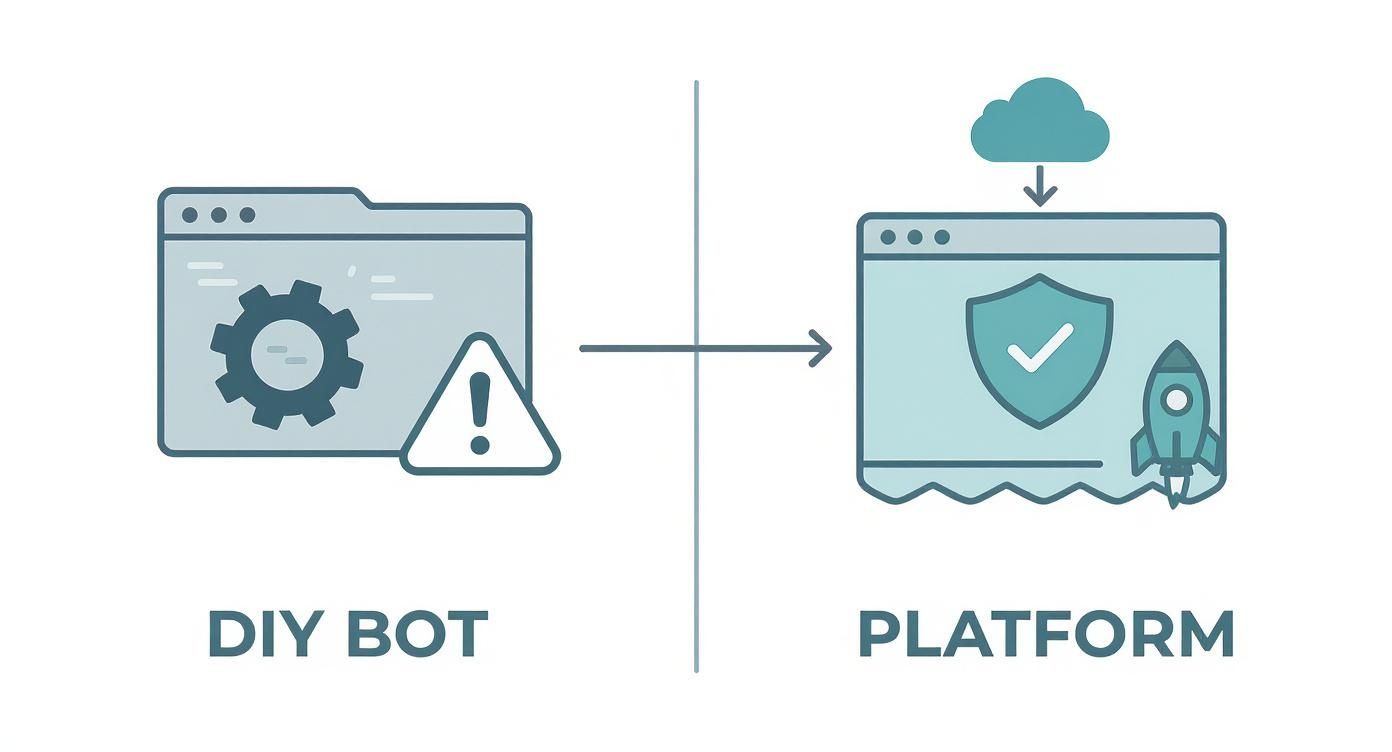
As you can see, the DIY path gives you total control but comes with a lot more technical overhead and risk. A managed platform, on the other hand, offers a much faster and safer route to scaling your outreach.
If you want to explore what a managed solution can do, you can learn more about the benefits of DMpro’s multi-account management, which handles all the account rotation, monitoring, and safety checks for you.
If you’re tired of manually sending DMs every day, try DMpro.ai — it automates outreach and replies while you sleep.
Got Questions About Building Your Own Twitter Bot?
So you're ready to dive into building a custom bot, but you probably have a few questions rolling around in your head. Let's clear them up. Think of this as the advice I wish I’d gotten before I went down this rabbit hole myself.
Are Twitter Bots Even Allowed? Is This Safe?
Yes, but it's a qualified "yes." X (formerly Twitter) allows bots, but they have to play by the rules. The platform is laser-focused on crushing spam and malicious behavior. As long as your bot isn't being a nuisance—harassing people, spreading junk, or going on an aggressive follow/unfollow spree—you're generally on solid ground.
The real risk here isn't getting into legal trouble; it's account suspension. To stay safe, your bot has to act human. That means respecting API rate limits, randomizing its activity patterns, and never, ever sending the same generic, spammy message over and over. A safe bot is a respectful bot.
What's the Real Cost of a DIY Bot?
The DIY approach seems like a bargain at first since there's no monthly subscription. That's a bit of an illusion. The biggest cost is one you can't easily put a number on: your time. Every hour you spend coding, debugging, and maintaining the bot is an hour you're not spending on growing your actual business.
But there are also hard costs that add up fast:
- API Access: The free X API tier won't cut it for any serious lead generation. You're looking at the $100/month Basic plan, minimum.
- Server Hosting: Your bot needs a home where it can run 24/7. That's a cloud server, which will set you back about $10-30/month.
- Good Proxies: If you plan on running multiple accounts without getting flagged, you'll need quality residential proxies. Budget another $50-100/month for those.
All of a sudden, your "free" project has a running tab of over $200/month just for operational costs. And that's before you factor in the value of your own time.
How Do You Know if It’s Actually Working?
Success isn't measured by the number of DMs you blast out. That's just a vanity metric.
The only number that truly matters is your reply rate. A high reply rate—I always shoot for 15% or better—is the ultimate proof that your targeting is on point and your message is resonating. Everything else is just noise.
Keep it simple. Track your sends, replies, and conversions (like a booked call or a new sign-up) in a basic spreadsheet. If that reply rate starts to dip, it's a flashing red light telling you to either refine your AI prompts or rethink who you're targeting. This feedback loop is what separates a simple script from a reliable lead machine.
If you’re tired of manually sending DMs every day, try DMpro.ai — it automates outreach and replies while you sleep.
Ready to Automate Your Twitter Outreach?
Start sending personalized DMs at scale and grow your business on autopilot.
Get Started Free