
Can You Schedule Tweets on Twitter? A Founder's Guide
Wondering can you schedule tweets on Twitter? Yes. This guide shows you how to schedule tweets to save time, stay consistent, and automate your brand's growth.
Let's get straight to it: yes, you can absolutely schedule tweets on Twitter. If you're a founder trying to scale, it's not just a nice-to-have—it's a core part of a smart growth strategy. This isn't just about saving a few minutes; it's about putting your content and lead generation on a predictable schedule so you can focus on building your business.
Yes, You Can, and It Will Transform Your Workflow

I used to treat Twitter as a purely "in-the-moment" platform, posting whenever an idea struck. The result? My engagement was inconsistent, and I constantly felt chained to my phone, trying to keep the momentum going. The moment I started scheduling my content, everything changed.
When you shift from random, manual posting to a planned content pipeline, you free yourself up to work on things that actually move the needle: product development, customer calls, and closing deals. It’s like putting your top-of-funnel marketing on autopilot so you can focus on scaling your SaaS.
Why Scheduling Tweets Is a Must-Do Strategy
For busy founders, the advantages are immediate. Here’s a quick breakdown of what you gain.
| Benefit | Impact on Your SaaS |
|---|---|
| Global Reach | Your content hits peak engagement times in different time zones, reaching prospects while you sleep. |
| Consistent Presence | You build authority and stay top-of-mind without being chained to your desk. |
| Mental Freedom | Batching a week's worth of content in one session frees up an incredible amount of mental space. |
| Strategic Messaging | You can plan ahead for launches and events, ensuring your messaging is cohesive and drives leads. |
This isn't a fringe tactic; it's standard practice for maintaining a strong brand presence and generating leads consistently.
Plus, Twitter's native tools are surprisingly good. You can schedule tweets up to 18 months in advance directly on the platform, which is perfect for planning out long-term campaigns or mapping content to your product roadmap. For deeper content planning, tools like SocialBee offer great resources.
Ultimately, scheduling is about taking command of your time and your message, making sure every tweet works as hard as you do to build your brand and bring in leads.
Scheduling Tweets Natively on Twitter (X)
Before you look at paid third-party tools, get comfortable with the scheduler built right into Twitter. It’s surprisingly effective and the fastest way to get a consistent posting cadence going without adding another subscription to your monthly bill. For most founders just starting out, the native scheduler is more than enough.
Scheduling a tweet is simple. On the desktop site, hit the blue “Post” button to open the composer. After writing your tweet and adding media, look for the small calendar icon at the bottom. That's your ticket.
Clicking that icon brings up the scheduling options. From there, just pick the exact date and time you want your tweet to go out. Once you hit confirm, the button changes from "Post" to "Schedule." Click that, and you're done.
How To Edit Your Scheduled Tweets
What happens if you schedule a tweet and then spot a typo? Or maybe some industry news breaks, and your scheduled post suddenly feels out of touch. Don't worry; nothing is set in stone.
You can easily see everything you have queued up. Open the tweet composer again, click the same calendar icon, and then look for the "Scheduled posts" link at the bottom. This shows you a clean list of everything waiting to be published.
This screenshot from Twitter’s help docs shows you exactly where to find that list.
From this screen, you have total control. You can tweak the copy, change the publish time, or delete a post that no longer makes sense for your strategy.
My Take: The native scheduler is the perfect starting point. It's simple, free, and lets you batch your content—like planning a week's worth of posts in one sitting. Mastering this feature frees you up to focus on the million other things your business needs. It’s a low-effort, high-impact move.
Using Third-Party Tools for Advanced Scheduling
While Twitter's built-in scheduler is a solid start, it's like using a hand drill when you need a power tool. To truly build a content machine and turn your Twitter account into a lead-generating asset, you'll want to look at third-party platforms.
Tools like Buffer, Hootsuite, or SocialBee are built for this. They go beyond simple scheduling, offering features that are game-changers for scaling your marketing and sales efforts. Think of them as the command center for your entire SaaS distribution strategy.
This is where you can start playing offense instead of defense with your content.
Go Beyond Basic Scheduling
With these tools, you're not just scheduling posts; you're managing a content strategy from a single calendar. This gives you a bird's-eye view, helping you spot gaps in your content mix and ensure you're consistently delivering value. No more scrambling to figure out what to tweet.
For founders and sales teams, some of the most impactful features include:
- Bulk Scheduling: Have a spreadsheet of tweet ideas? Upload a CSV and schedule dozens—or even hundreds—of posts at once. It’s a massive time-saver for batching content.
- Evergreen Queues: This is a favorite. Build a library of your best-performing content (like cornerstone blog posts or case studies), and the tool will automatically reshare it. This keeps your feed active and constantly drives traffic to your most important assets.
- Smart Timing Suggestions: These platforms analyze your engagement data to tell you the best times to post, ensuring your content gets seen by the most people in your target audience.
Key Insight: The real power here isn't just scheduling. It's about building a repeatable system—a content engine that runs on its own, freeing you up to focus on product and conversations with customers.
These platforms also come with deep analytics, showing you which posts drive clicks, replies, and new followers. This data is gold for refining your messaging and doubling down on what’s working.
Once your scheduled content attracts the right followers, the next step is automating your outreach. This is where combining smart content scheduling with direct engagement tools creates a powerful growth loop. For instance, while your scheduled tweets build authority, a platform for Twitter automation like DMpro can engage new, relevant followers with personalized DMs, turning passive viewers into active leads.
A Simple Strategy for Scheduling Your Content
Knowing how to schedule tweets is only half the battle. The magic happens when you have a solid strategy. Simply filling a calendar with random posts won't cut it; you need to be intentional to generate leads and scale distribution.
First, nail down when your audience is online. This takes some trial and error, but it's worth it—data shows that tweets sent during peak hours can get 1.5 to 2 times more interactions in the first hour. Considering the average tweet's lifespan is about 18 minutes, timing is critical. You can dig into more Twitter marketing statistics on brentonway.com.
Find Your Content Mix
Once you know the when, figure out the what. A feed that's just a stream of sales pitches is a surefire way to get ignored. Your scheduled content should feel just as authentic as if you were posting live.
A great starting point is the 50/30/20 rule:
- 50% Value: Share useful tips, insightful threads, and resources that solve a problem for your followers. This builds trust and establishes you as an expert.
- 30% Conversation: Don't just broadcast. Ask questions, run polls, and reply to others in your industry. This shows there's a real founder behind the account.
- 20% Promotion: Now you can share links to your blog, announce a product update, or talk about your SaaS. Because you've spent the other 80% building goodwill, these posts will land much better.
This simple decision tree can help you decide which scheduling approach fits your current needs.
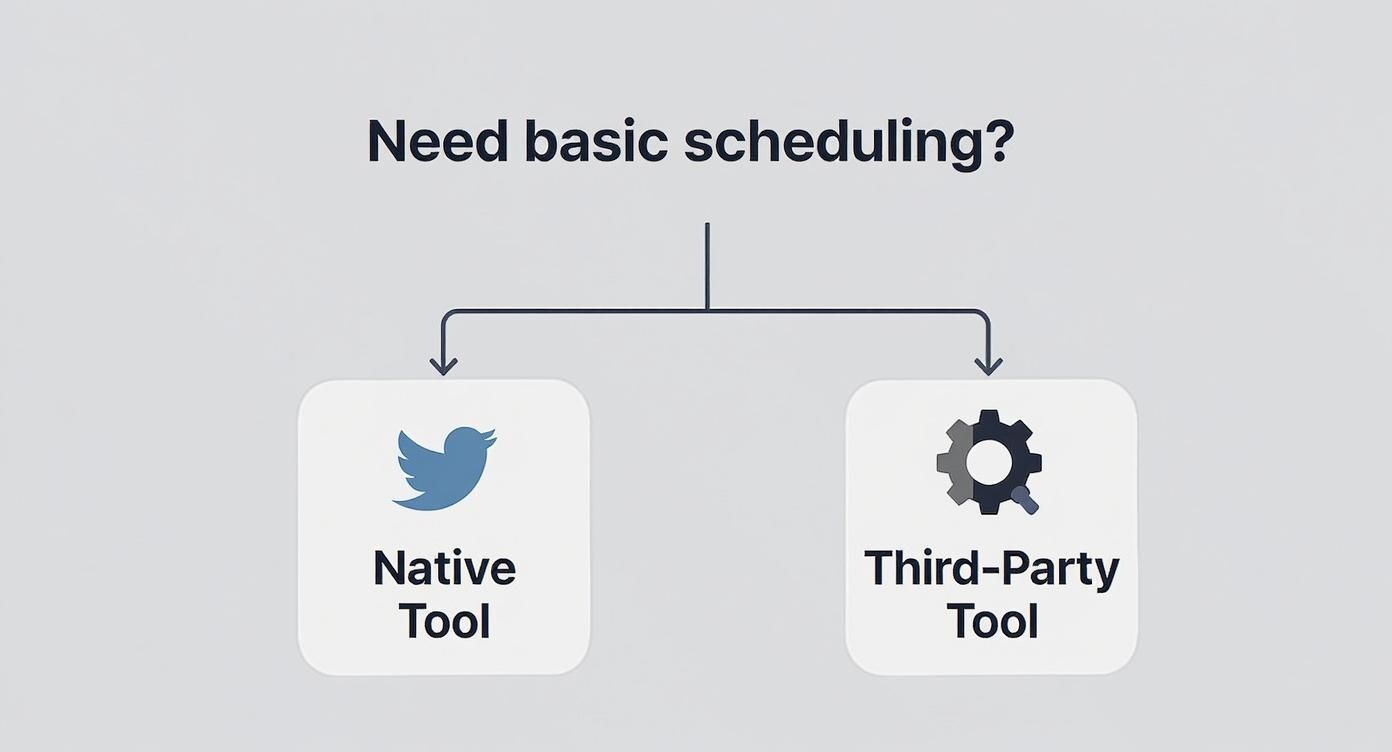
It's perfectly fine to start with native tools. As your strategy gets more sophisticated, you can graduate to more powerful third-party platforms.
Track What Works
A content strategy shouldn't be set in stone. Constantly monitor which posts get engagement, drive clicks, and bring in leads. This isn't about vanity metrics; it’s about refining your strategy and doing more of what works. A tool with strong analytics and reporting features can give you a clearer picture of what's moving the needle for your SaaS.
Automating Beyond Tweets for Lead Generation
<iframe width="100%" style="aspect-ratio: 16 / 9;" src="https://www.youtube.com/embed/yJxoaZ9iCnw" frameborder="0" allow="autoplay; encrypted-media" allowfullscreen></iframe>Scheduling tweets is a great first step. It gets your content engine running. But if you're serious about scaling your SaaS, the real magic is automating your engagement to turn that attention into actual leads.
Think about it: your scheduled tweets reel in new followers who fit your ideal customer profile. Now what? You need a way to start conversations with them, and you can't do it one by one if you want to scale. This is where you pair your content machine with an outreach engine.
Your content warms up the audience and positions you as an authority. At the same time, a tool like DMpro.ai can be your secret weapon, automatically sending personalized welcome DMs to new, relevant followers.
You end up with a powerful system: your content draws people in, and smart automation proactively turns them into valuable conversations. All without you manually tracking and messaging every single person.
This is how you move from just building a follower count to building a predictable sales pipeline. It helps you pinpoint high-intent prospects almost immediately. For more advanced outreach, you can use Twitter lead scraping to find and connect with potential customers who haven't even followed you yet. This creates a complete system for both inbound interest and outbound prospecting.
Got Questions About Scheduling Tweets?
Once you start scheduling tweets, a few questions always come up. Here are the most common ones I hear from other founders.
Can I Edit a Scheduled Tweet?
Absolutely. Nothing is locked in until the tweet goes live.
Whether you're using Twitter's built-in scheduler or a third-party app, you'll have a clear dashboard of everything queued up. You can easily pop in to tweak the text, switch out a photo, or adjust the send time.
How Far in Advance Can I Schedule?
With Twitter's own tool, you can schedule content up to 18 months out. It sounds like a lot, but it's handy for planning around big company milestones, annual industry conferences, or long-term marketing campaigns. Most third-party tools offer a similar runway.
Does Scheduling Hurt My Engagement?
This is a stubborn myth, but the answer is a clear no. The Twitter algorithm does not penalize scheduled tweets. What matters is the quality of your content, its relevance, and the timing—not how it was published.
In my experience, scheduling actually improves engagement. It lets you consistently hit peak activity hours when your audience is online, giving your content the best shot at getting seen, even when you're in meetings.
Think of scheduling as just another tool. When used strategically, it makes your account more consistent and timely—two of the biggest drivers of real engagement on Twitter.
If you want to dig deeper into how automation and the platform work together, we cover a lot more on our FAQ page.
If you’re tired of manually sending DMs every day, try DMpro.ai — it automates outreach and replies while you sleep.
Ready to Automate Your Twitter Outreach?
Start sending personalized DMs at scale and grow your business on autopilot.
Get Started Free